Is your small business paperwork necessary? One word: YES! They need to be accessible at a moment’s notice. The IRS might need them if you were audited. Your accountant may need them if she is doing your taxes. You may need them if you have to reference client information. A sound filing system for all your paper types will make your office run more efficiently.
Just like the brain, we need to be able to retrieve information from some system. Your small business paperwork systems depend on you and what works best for you.
Key Takeaways
- Small business paperwork systems are essential for easy retrieval during audits or tax preparations.
- Create organized systems for different types of paperwork, including billing, invoicing, receipts, clients (affiliate), and projects.
- Consider using digital file structures alongside physical systems to ensure accessibility and organization.
- Implementing a clear workflow for each paper helps maintain efficiency and prevents the loss of important documents.
- Use resources and tools, such as accordion folders (affiliate) and online bookkeeping applications, to streamline your paperwork management.
Topics Discussed
First, change your viewpoint on the collecting paper. Consider it to be an important part of your business, whether you have a home office or a physical office. Look at it this way: every company has to do what you are doing regarding the paper. So, grin and bear it. OK?
Each piece of paper should have a system associated with it.
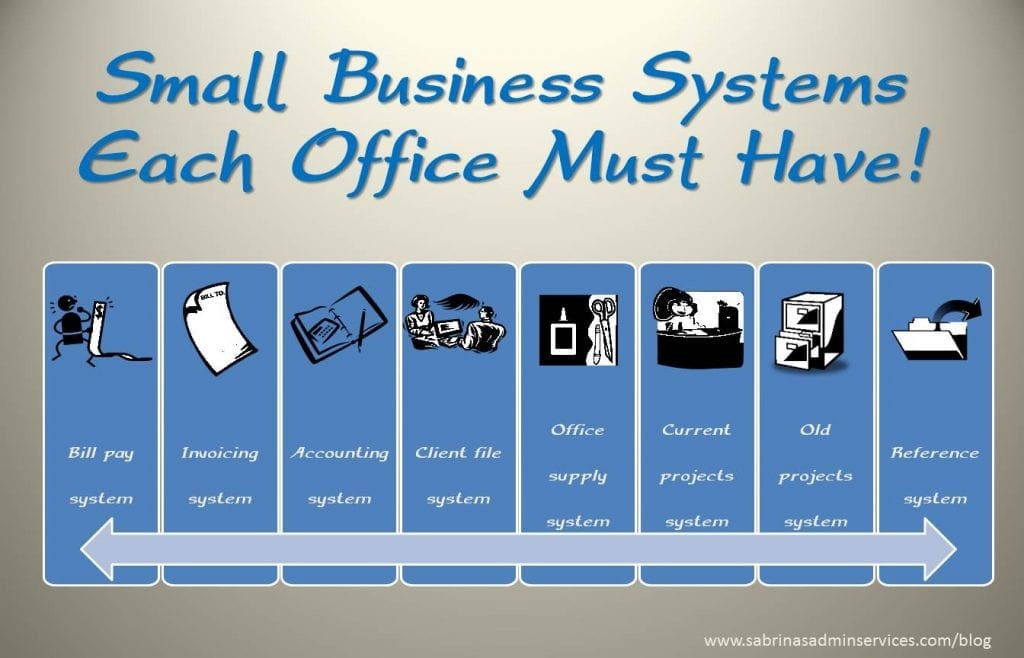
Here are eight examples of systems associated with different pieces of paper.
A Bill pay system for your bills.
A bill pay system will help you keep track of all the vendors and employees /subcontractors you need to pay. It will also include the procedures needed to ensure the system runs effectively.
Start by writing down where you use your apps and websites to pay bills. This would include your business checking account, bank, credit card companies’ websites, and vendor login information.
Create a vendor/bills-to-pay checklist for the entire year. Then, write the date you paid the bill each month.
Using a spreadsheet app, you can add all this information above to help you get organized. Include the app links so you can immediately click through and pay bills without having to search for different websites.
A portable filing system, like an accordion folder, that I found on Amazon (affiliate) (affiliate) works well if you do not have many papers to file.
Accordion folders are handy for small business owners with small remote offices.
 Buy Now →
 (affiliate)
An Invoicing system for your invoices to the client.
The following section outlines how to establish a well-organized invoicing system. This system could be through an online service like QuickBooks Online or a desktop version of Quicken (affiliate).
Usually, these applications have accounts (categories) already set up when you start the app. Check out my post about Simple Tips to Organize Your Start-Up’s Invoice Process.
Here’s an example of preprinted invoices.
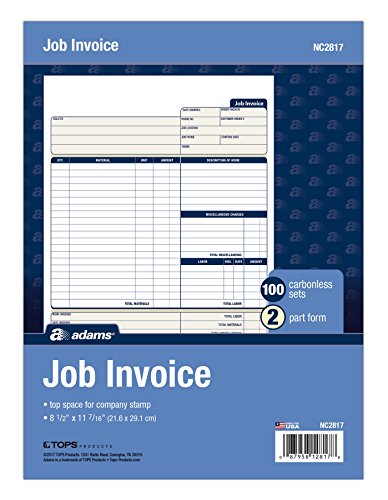
Invoice Forms, 2-Part Carbonless, For Service and Repair Billing
Buy Now →(affiliate)
An Accounting system for your receipts for purchases.
While we discussed a billing system above, this is how you handle your support paperwork in your office, whether digital or physical. This is key to showing that your deductions/income are legitimate.
This also includes if you do payroll. Federal, state, and local tax agencies require a well-organized, secure area to store all these critical documents. Visit our posts below to make the right digital or physical binder.
How to Create a Well-Organized Small Business Bookkeeping Binder
How to Make a Digital Bookkeeping Binder
To organize digital receipts, check out our recent post: How to Make a Well-Organized Business Digital Receipt Organizer.
Mini Organizers for Receipts
If you prefer paper receipts and don’t want to scan each one, you can organize them in one of these small accordion folder organizers that store all your receipts by business category. I found this one on Amazon (affiliate) (affiliate). Pick one that stands up on its own, making it easier to file receipts away.
This accordion folder has 13 tabs and is great for keeping track of small loose receipts for tax purposes.
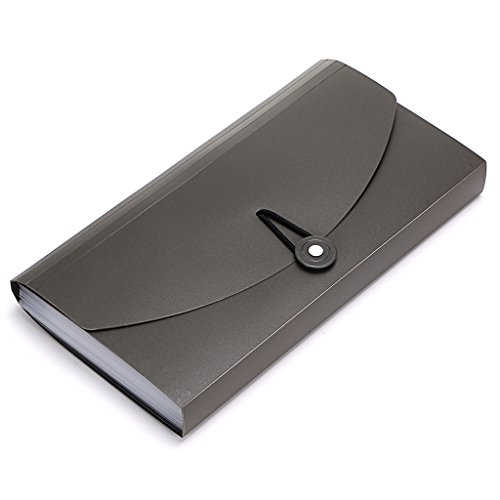
Accordion File Folder Small Holder File 13 pockets
Buy Now →(affiliate)
A Client file system for your client correspondence.
Now that we’ve discussed the administrative aspects of your business, it’s important to discuss a system that would work well for clients (affiliate). An established system is important whether you have physical or virtual clients (affiliate).
Creating an onboarding process for your new clients will make the transition to your business processes easier. This could be by making checklists for areas to complete. A questionnaire for the new client and for when the project ends. Visit our posts below for more guidance.
10 Effective Business Testimonial Questions
This is a durable option for organizing client information.

File Folders with Fasteners, Dividers, 2” Expansion 10 pk – Green
Buy Now →(affiliate)
An Office supply system for your paper and other office supplies.
Now, let’s move on to the supply area of your office. This area should have everything you need so everyone can access the supplies. Determine the shelving you need by gathering all your items, then sorting them by type. Bins, open and closed, would work for small things. Clear filing totes also work for items that can’t get wet. Read more to make your office supply system organized.
Below are the products you may need when organizing your supplies.

Storage Bins with Lids Plastic Storage Container with Lids
Buy Now →
Tote, 64-Quart Clear Plastic Bin with Lid and Latching Handles
Buy Now → Buy Now →
Tote with Locking Handles, 18.5 x 14.25 x 10.88 Inches, Clear/Silver
Buy Now →(affiliate)
A Current project system for your current client activities.
Current projects are key to success, especially if you work in an office and deal with lots of paper. Keeping all your client papers in one space will ease your stress. The key is to find the right-sized bin or hanging folder (affiliate) for the number of papers you have. I particularly like having a stack of bins, one for each client, stored away in a locked cabinet to protect my client’s information. I pull out only that client’s paperwork when I work with the client. Then, when I am done, it gets placed in its appropriate bin.
Here’s an example of a paper organizer when you have several clients to manage.

Cubby System, Adjustable Organizer for Paper Sorter Large
Buy Now →(affiliate)
If you are looking for filing systems that will help you with on-the-go business, check out our posts below:
7 Questions to Ask When Creating a Mobile Office Organization System
Get a free book The Best Practices for Digital and Physical Filing Systems for a deep dive into the process of filing systems.
An Old projects system for your old (closed) client activities.
The next set of small business paperwork systems is for old client activities. Pulling these files out and placing them in a different location will allow more new clients to appear and give you room to update your focus or direction with them. Place these files in a less accessible area of your office, such as a back closet.
A Reference system for your reference pages to look at in the future.
While this system can be digital or physical, you likely have references you use in your business or career. This area should be organized to make it easy for you and your staff to retrieve items. Using a well-organized bookshelf by topic works well for these physical references. Digital references, such as bookmarks in your browser and your computer’s folder structure, will save you time when looking for something.
Below is an image of “Systems Each Small Business Must Have” that you can share.
If you decide not to store physical paper, that is OK. However, you still need file systems on your computer to retrieve files when you need them.
How to Make a Digital Small Business Paper Systems File Structure
For digital systems, you will need to organize your folders by category or system type, such as “Bills paid 2026,” which would be one folder. “Client files (affiliate) organized by client name would be another filing system.
The way to remember these digital folders is to write down the locations on a piece of paper as a reference and post it near your computer. Here are some examples of what to write to remind you of your system:
Where to store this digital file?
To file bills, use the c:\document\2026billspaid\… folder.
For the current year receipts, file in c:\document\2026taxreceipts\…
To file client correspondences, use c:\documents\clients\….
Keep this list of where your digital files are near you. It can hang on the wall near your desk (affiliate). This list is handy for new staff to learn your business’s digital filing structure immediately.
I recently wrote a post about How to Make a Digital Bookkeeping Binder. Feel free to check it out, or fill out the form below to pick up the FREE file-structure ebook to help you build your organized digital system.
Digital Bookkeeping Binder Folder Layout
You are signing up for our newsletter to get a copy of our Digital Bookkeeping Binder Folders Layout from our post “How to Make a Digital Bookkeeping Binder”.
Whichever system you use, ensure a clear path from beginning to end. Each paper should include steps to reach its destination. =) It could be one or 10 steps, whichever works for you. Write the steps down for either system to remind you of the process. This will help you clear your office of paper piles and make it clear where everything is stored. Hopefully, nothing will ever be lost again.
Revisit even more tips and tricks for paper management by clicking here.
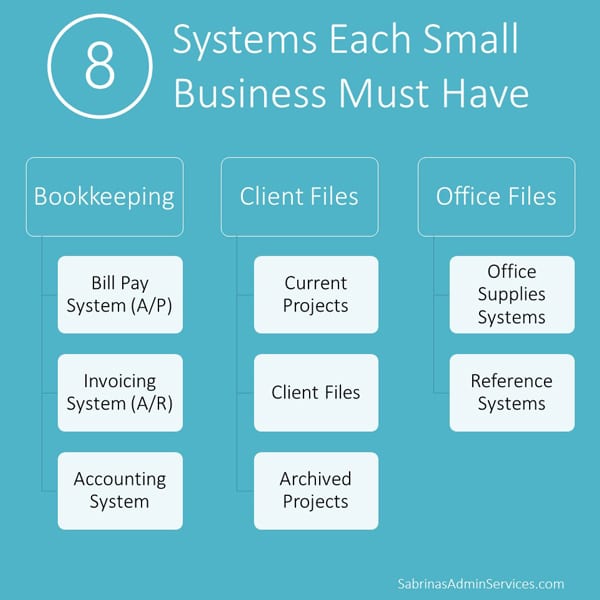
I hope this post helps you get your small-business paperwork systems in place so you never have to revamp them again.
Feel free to visit these articles I found online for more information about small business paperwork systems.
How to Create a Filing System That Works for Your Business
7 steps to organize business paperwork so you always find what you need
Please leave a comment or question below so we can expand this article in the future. Best to you and your business.
Please note these are affiliate links through Amazon (affiliate), and at no additional cost, I will earn affiliate fees if you decide to make a purchase.







This business paperwork is new to me and I’m just learning what to keep and how to use it on my taxes. Unfortunately, I’m a bit of an “out of sight out of mind” type which means that I need systems that are accessible and neat looking (at least during the current year till they’re boxed). I’m pinning this for reference later.