Effective office filing systems help your business run more smoothly. Whether you have a huge office, a home office, or a mobile mini office, you can find papers more easily and save time looking for them. And when I say time, I mean hours. Studies show that the average professional spends roughly 4.3 hours per week searching for papers. For a solopreneur, that is time you simply cannot afford to waste.
The truth is, most small business owners I work with did not set out to have a messy filing system. It happens gradually. A stack of papers here, a misfiled invoice there, and before you know it, your filing cabinet (affiliate) has become a black hole where documents go to disappear.
The good news? You do not need a complicated system. You need a consistent one. This guide will walk you through everything you need to create, maintain, and sustain a filing system that actually works for your small business. Whether you are starting from scratch or fixing a system that has gotten out of control, these tips will help you take back control of your paperwork.
Get Your Free Small Business Ebooks — Get All of Them Today!
Estimated reading time: 19 minutes
What You Will Learn in This Guide
- Determine how you want to retrieve the files.
- Label Each Hanging and Manila Folder
- Hanging Folder Options
- Stick with the same labeling system
- Leave space in the drawer for new files.
- Label the Outside of Each Filing Cabinet Drawer
- Label Maker Options
- Everyone needs to know the filing system organization.
- Common Paper Filing Mistakes to Avoid
- Revisit files every year or two.
time and heading and key takeaways
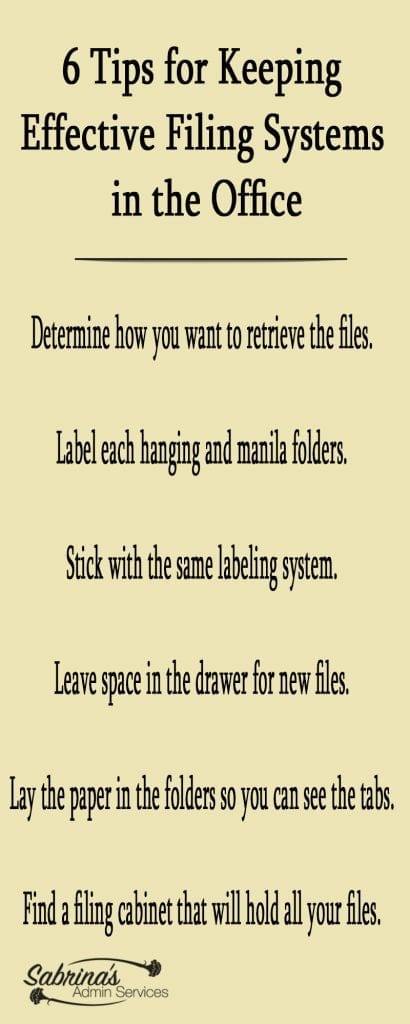
Determine how you want to retrieve the files.
Before you buy a single folder, ask yourself one important question: How do I look for things? This is the foundation of your entire filing system, and getting it right makes everything else easier.
Think about it this way. When you need to find a document, what is the first thing that comes to your mind? Do you think of the client’s name? The project? The date? The type of document?
Your retrieval method should match how your brain naturally searches for information.
Common Filing Methods for Small Businesses
Alphabetical by name: Best for client-based businesses like salons, coaching practices, pet services, and consulting firms. If the first thing you think is “I need the Smith file,” this is your system.
By category or topic: Ideal for businesses that deal with many different types of documents. Your main categories might include Clients (affiliate), Vendors, Financial, Legal, and Operations.
Chronological by date: Works well for project-based businesses like construction or event planning, where you think in terms of timelines.
By frequency of use: Place the files you access daily or weekly in the most accessible drawer, and archive older files in a less convenient location.
Using Broad Categories and Subcategories
Keep in mind that you may want to use broad categories and subcategories. To do this, use a hanging folder (affiliate) for the broad category and manila folders (affiliate) for the specific subcategories. This two-tier system keeps things organized without becoming overly complicated.
Example 1 – Subcontractors: Your main hanging folder (affiliate) would be called “Contractors.” The manila folders (affiliate) inside would be the names of each subcontractor working with your business. You can add a note to the manila folder (affiliate) with the name of the hanging folder (affiliate) to help anyone returning the file to the right spot.
Example 2 – Utilities: Utilities can include a variety of services, such as gas, electricity, and water. The main hanging folder would be called “Business Utilities.” Each manila folder (affiliate) would have a specific name, such as Gas, Electric, Water, Internet, and so on.
Example 3 – Client Projects: If you run a marketing agency or consulting firm, your hanging folder might be the client name, with manila folders (affiliate) for each project or engagement period inside: “Q1 Campaign,” “Website Redesign,” “Ongoing Retainer.”
Pro tip: Before you set up your system, grab a notepad (affiliate) and write down the last ten documents you searched for. What was the first thing you thought of when looking for each one? That pattern is your answer to how your system should be organized.
Label Each Hanging and Manila Folder
This step sounds simple, but it is one of the most overlooked parts of a filing system. Duplication of label titles between your hanging folder and manila folder (affiliate) will help keep your files in the right place. If you remove the manila folder, you will know what section to place it in when you need to return it. And more importantly, someone else will know too.
Here is why this matters: If someone removes a manila folder labeled “John Smith” and the hanging folder behind it is also labeled “John Smith,” anyone can see that a file is missing from that spot. Without the matching label on the hanging folder, you would never know a file was taken out.
Labeling Best Practices
Be specific but concise. “Smith, John – Consulting Agreement” is better than just “John” or “Consulting.”
Use a consistent format. Decide whether you will use “Last Name, First Name” or “First Name Last Name” and stick with it everywhere.
Make labels (affiliate) readable. If your handwriting is hard to read, invest in a label maker (affiliate) or print your labels (affiliate). Your future self and your team will thank you.
Include dates when relevant. For contracts and agreements, adding the year helps you quickly identify current versus expired documents.
Choosing Your Folders
When selecting folders, you have options that suit different needs and budgets.
Hanging folders (affiliate) are available in large, reinforced versions for heavy use, or in standard options in assorted colors or plain green. The reinforced ones are worth the extra cost if you access files frequently.
Hanging Folder Options

Hanging File Folders, Pendaflex extra wide 2″, Letter Size, 1/5 Cut, 25/BX
Buy Now → Buy Now →
 (affiliate)
Please note these are affiliate links through Amazon (affiliate), and at no additional cost to you, I will earn an affiliate commission if you decide to make a purchase.
Manila folders are available in multiple colors or the classic cream. Colored manila folders are great for visual organization, especially when paired with a color-coding system.
You can get them in color or plain cream
 Buy Now →
File Folders, Letter Size, 8-1/2″ x 11″, Classic Manila, 1/3-Cut Tabs in 100/box
Buy Now →(affiliate)
Please note these are affiliate links through Amazon (affiliate), and at no additional cost to you, I will earn an affiliate commission if you decide to make a purchase.
Pro tip: Invest in folders with reinforced tabs (affiliate). The cheap folders with flimsy tabs (affiliate) break quickly, and when a tab breaks, that file essentially becomes invisible in your drawer. It is a small investment that saves a lot of frustration.
Stick with the same labeling system
Consistency is king when it comes to filing. Nothing derails a filing system faster than switching methods halfway through.
With hanging folders (affiliate), you have two options for adding the tab.
You can add the tab to the back of the hanging folder and place the contents in front, or you can add the tab to the front of the hanging folder and place the papers and manila folders behind it.
Either method works, but pick one and stick with it across every single drawer.
Creating a Color-Coding System That Works
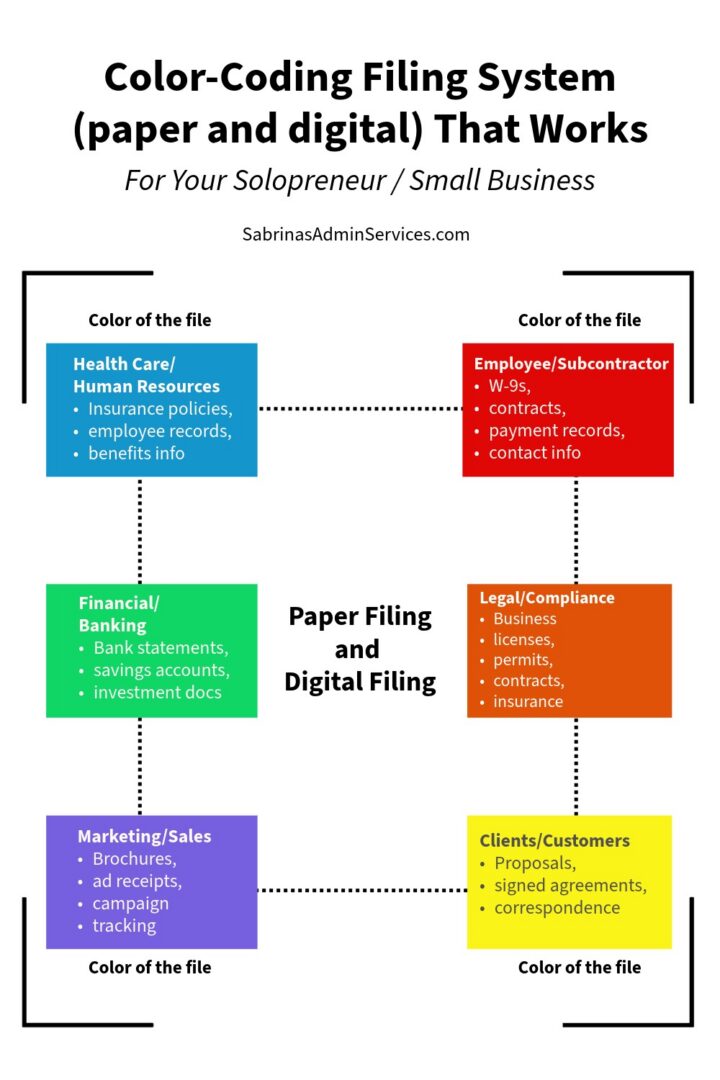
If you use colored folders for particular categories, keep using those colors consistently. The manila folders and hanging folders (affiliate) should be the same color for each broad category. Here are some common color assignments that work well for small businesses:
| Color | Suggested Category | Example Contents |
| Blue | Health Care / HR | Insurance policies, employee records, benefits info |
| Green | Financial / Banking | Bank statements, savings accounts, investment docs |
| Red | Employees / Subcontractors | W-9s, contracts, payment records, contact info |
| Yellow | Clients (affiliate) / Customers | Proposals, signed agreements, correspondence |
| Orange | Legal / Compliance | Business licenses, permits, contracts, and insurance |
| Purple | Marketing / Sales | Brochures, ad receipts, campaign tracking |
Whatever system you use, the key is consistency.
Create a simple reference sheet listing your color assignments and post it near your filing cabinet (affiliate). This is especially helpful if someone else ever needs to file or retrieve documents in your absence.
Pro tip: You can create color-coded files in Windows by using apps like Folder Maker, Folderlco, or Folder Colorizer if you decide you want to use the same colors on your computer. For Mac, you can use macOS features, see these instructions: Customize the look of folders and files on Mac from Apple (affiliate). .
Get our free The Best Practices for Digital and Physical Filing Systems ebook to help you organize your entire small business!
Leave space in the drawer for new files.
This is one of those tips that seems obvious but gets ignored all the time. If your filing cabinet (affiliate) drawers are stuffed to the brim, filing becomes a chore. And when filing becomes a chore, papers start piling up on your desk (affiliate) instead.
We tend to underestimate how much room we need in a filing cabinet. A good rule of thumb is to keep each drawer no more than 75 percent full. This gives you room to add new files, flip through existing ones easily, and keep folders from getting crumpled and hard to read.
Purging files every year to make room for new ones will not only help your filing system stay current but also make it more refined and relevant to what is happening in your business that year.
Choosing the Right Filing Cabinet
If you are shopping for a filing cabinet, a lateral filing cabinet is a good option and can store many files. They are wider than standard vertical cabinets, which means your folders sit side by side rather than front to back. This makes it easier to see file labels (affiliate) at a glance and to flip through folders quickly.
When choosing a cabinet, consider the weight capacity, whether it has a lock for sensitive documents, how many drawers you need, and whether it fits the space in your office.
For home offices with limited space, a two-drawer lateral cabinet can hold a surprising amount of paperwork while doubling as a surface for your printer or other supplies.
These are two types of lateral filing cabinets

Lateral Filing Cabinet by Bush Furniture
Buy Now → Buy Now →
 (affiliate)
Please note these are affiliate links through Amazon (affiliate), and at no additional cost to you, I will earn an affiliate commission if you decide to make a purchase.
Lay the Paper in the Folder So You Can See the Tabs
Another effective filing system tip is to make sure papers are filed in the correct folder. When the filing cabinet is full, papers tend to stick up and obscure the tabs (affiliate) on hanging and manila folders. Once you can no longer see the tabs, you start pulling out the wrong folders, which wastes time.
Take an extra minute to press the papers down by pulling out the folder, placing them in it neatly, and then filing it away. This small habit makes the file name easy for you and your staff to see.
Additional Paper Filing Habits That Save Time
File papers with the most recent on top. When you open a folder, the first thing you should see is the newest document. This saves you from flipping through an entire folder to find the latest version of something.
Use a consistent orientation. All papers should face the same direction with the top of the page toward the tab. It seems minor, but it makes scanning through a folder much faster.
Staple, do not paperclip. Paperclips catch on other documents and pull pages out of their order. If multiple pages belong together, staple them. If you need to keep them unattached, use a small binder clip.
Do not overstuff individual folders. If a manila folder is getting thick, split it into two folders. A folder labeled “Smith, John (2025)” and “Smith, John (2026)” is much more manageable than one bulging folder that is impossible to flip through.
Label the Outside of Each Filing Cabinet Drawer
It may seem like an eyesore, but people looking for things in a filing area can easily find the right drawer when it is labeled from the outside.
Label each drawer with a broad topic to help you and others find the right drawer more quickly and painlessly. Do not be overly specific. Use very broad topics like “Company Administrative,” “Contracts,” “Agreements,” “Client Files (affiliate) A to M,” and so on.
If you have multiple filing cabinets, this becomes even more important. Without labels, people (including you) will repeatedly open the wrong drawer, wasting time and causing frustration.
Drawer Labeling Tips
Use removable labels so you can update them when your system evolves. Label maker (affiliate) tape (affiliate) or adhesive label holders that slide in and out both work well.
Label Maker Options

Label Maker – P-touch CUBE Plus Bluetooth, white uses an APP
Buy Now →(affiliate)
Include date ranges for archival drawers. “Tax Records 2020-2023” immediately tells you whether the drawer is relevant to your search.
Create a filing cabinet map. If you have several filing cabinets, make a simple floor plan map showing what each drawer in each cabinet contains. Post it on the wall nearby or inside the first drawer. This is incredibly helpful for anyone who does not use the filing system every day.
Here’s an example from Amazon.

P-Touch Brother PTD220 Home/Office Everyday Label Maker up to ~1/2 inch
Buy Now →(affiliate)
Everyone needs to know the filing system organization.
Filing systems only work if everyone knows how they are organized. This is critical for businesses with employees, subcontractors, or even an on-site part-time assistant who handles your paperwork. If you are the only person who knows the system, you become the bottleneck every time someone needs a document.
Write down the exact instructions for your filing system so others can reference them.
Hang the instructions near your filing cabinet so everyone can refer to them when needed.
Include details like your naming conventions, color codes, where specific categories are located, and what to do with documents that do not seem to fit anywhere.
Creating a Filing System Reference Guide
Your reference guide does not need to be complicated. A one-page document that covers the following is plenty:
- An overview of your filing method (alphabetical, by category, etc.)
- Your color-coding system with specific assignments
- Naming conventions for labels (Last, First or First Last)
- Where each category lives (which cabinet and drawer)
- What to do with documents that do not fit an existing category
- When and how to archive old files
- Who to ask if something is unclear
I did this when I was an office manager and really helped when I was on maternity leave.
If you have several filing cabinets, include the floor plan map mentioned earlier. As a result, users of the filing cabinets do not have to ask you where files are. They can find what they need independently, which frees up your time for the work that actually grows your business.
Pro tip: Review your filing instructions with anyone who will be using the system. A five-minute walkthrough prevents weeks of misfiled documents.
Pair Your Physical Filing System with a Digital Backup
In today’s business world, relying solely on paper files is risky. A single water leak, fire, or coffee (affiliate) spill could destroy critical business documents. That is why every solopreneur and small business owner should pair their physical filing system with a digital backup.
This does not mean you need to go completely paperless. It means the most important documents in your filing cabinet should also be stored in a safe (affiliate) digital format.
Check out my extensive guide to creating a digital business bookkeeping receipts file system.
Documents You Should Always Have a Digital Copy Of
- Signed contracts and agreements
- Tax returns and supporting documents
- Business licenses and permits
- Insurance policies
- Bank and financial statements
- Client proposals and signed agreements
- Vendor contracts and W-9 forms
- Employee or subcontractor records
Setting Up Your Digital Filing System
Your digital filing system should mirror your physical one. If your paper files are organized by category (Clients (affiliate), Financial, Legal), your digital folders should use the same structure. This makes it intuitive to find things in either place.
Use a cloud storage service like Google Drive, Dropbox, or OneDrive to store your scanned documents. Cloud storage gives you access from anywhere and provides automatic backup protection. Name your digital files consistently, including the date, document type, and relevant name. For example: “2026-03-15_Contract_SmithJohn.pdf” is much easier to search for than “scan001.pdf.”
Pro tip: Set a recurring reminder to scan important documents as they come in rather than letting them pile up. Even 10 minutes at the end of each week will keep you current. Your phone’s camera and a free scanning app work perfectly for this.
Know Your Document Retention Requirements
One of the biggest questions small business owners ask is “How long do I need to keep this?” Holding onto every piece of paper forever is not practical, but throwing things away too soon can create legal and tax problems.
While you should always consult with your accountant or attorney for advice specific to your business, here are some general guidelines that apply to most small businesses in the United States:
| Document Type | Recommended Retention Period |
| Tax returns and supporting docs | 7 years |
| Bank and financial statements | 7 years |
| Accounts payable/receivable | 7 years |
| Employee payroll records | 7 years after termination |
| Business licenses and permits | Keep current; retain expired for 7 years |
| Contracts and agreements | 7 years after expiration |
| Insurance policies | Keep current; retain expired for 3 years |
| Client correspondence | 3-5 years after last contact |
| General business correspondence | 3 years |
| Utility bills and routine expenses | 1-3 years |
| Corporate records (articles, bylaws) | Permanently |
| Real estate and property records | Permanently |
| Loan documents | 7 years after payoff |
Important: These are general guidelines, not legal advice. Specific industries like healthcare, financial services, and child care may have longer or different requirements. Always check with a qualified professional for your specific situation.
Take a look at my How Long Should I Keep Business Records.
Common Paper Filing Mistakes to Avoid
After more than 20 years of helping small business owners get organized, I have seen the same filing mistakes recur. Here are the most common ones and how to avoid them:
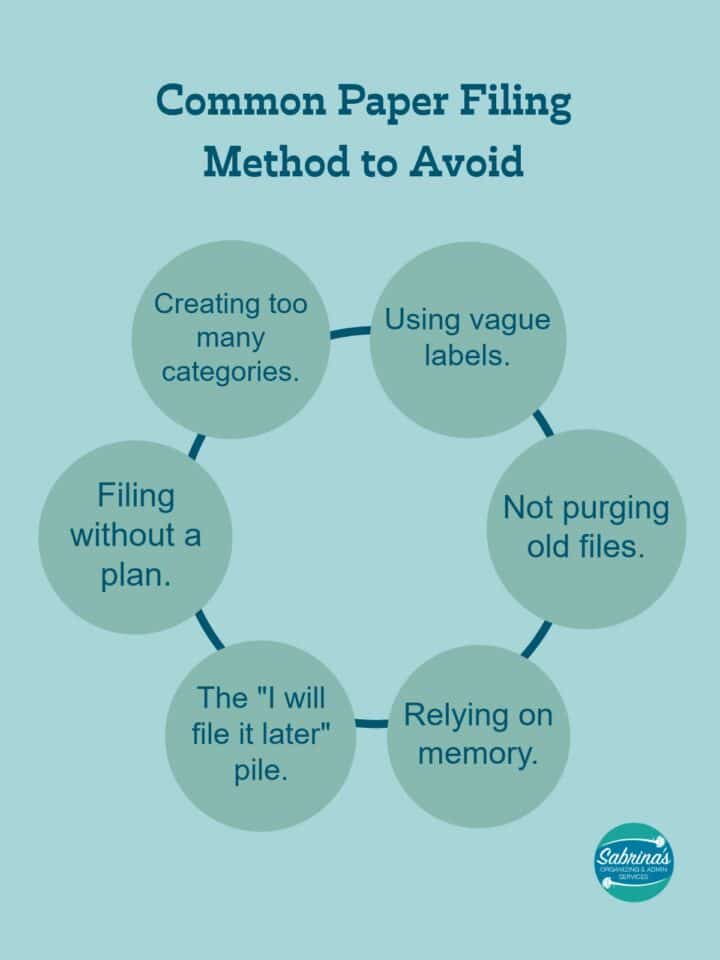
Creating too many categories. When everything has its own category, nothing is easy to find. A filing system with 50 categories is just as dysfunctional as one with none. Start with 5-8 broad categories, and create subcategories only when a folder becomes too full.
Filing without a plan. Stuffing papers into the nearest available folder is not filing. Every document should have a clear, logical home. If you cannot figure out where something goes, that is a sign your categories need adjustment, not that the paper should go in a miscellaneous pile.
The “I will file it later” pile. That stack of papers on your desk (affiliate) that you plan to file later? It never gets filed. Build a 5-minute filing habit at the end of each day. Five minutes is all it takes to prevent the pile from growing.
Not purging old files. Filing cabinets are not storage units. If you never remove old or irrelevant documents, your system gets bloated and hard to navigate. Annual purging is not optional; it is essential maintenance.
Using vague labels. “Miscellaneous,” “Stuff,” or “To Sort” are not categories. If a folder is labeled “Miscellaneous,” it will become a dumping ground. Every folder needs a specific, descriptive name.
Relying on memory. “I will remember where I put that” is the most dangerous sentence in office organization. Write your system down. Label everything. Assume that future-you will not remember what present-you was thinking.
Revisit files every year or two.
Revisiting your files each year and clearing out the unused or unnecessary ones helps keep your space decluttered and organized, so you will not need to add filing cabinets to your office. It will also remind you of things that may no longer be relevant, so you can get rid of them.
How to Conduct Your Annual File Review
Set aside a dedicated block of time for your annual review. For most solopreneurs, this takes two to four hours. Here is a simple process to follow:
- Go through each drawer one at a time. Do not try to tackle everything at once.
- For each file, ask: Is this still relevant to my business? Do I need the physical copy, or is a digital version enough? Am I legally required to keep this?
- Shred anything with sensitive information like Social Security numbers, bank account details, or client personal information. Never just throw these in the recycling bin.
- Move files that are past their retention period but not ready to shred into a clearly labeled archive box. Store it in a closet or storage area, not your filing cabinet.
- Reorganize remaining files so the most current and frequently accessed items are front and center.
Pro tip: Schedule your annual file review at the same time each year. Many of my clients find that January or the week after tax season works well because you are already in a business-reflection mindset. Put it on your calendar now so it actually happens.
Visit our benefits and tips to revisit paper files yearly to help you do this task.
Get our free The Best Practices for Digital and Physical Filing Systems ebook to help you organize your entire small business!
When to Call in Professional Help
If your filing system has gotten completely out of control, or if you simply do not have time to set one up from scratch, that is exactly the kind of project an administrative professional, subcontractor, or assistant can handle for you. A fresh set of experienced eyes can often see organizational solutions that you might miss when you are too close to the problem.
Whether you need someone to create a filing system from the ground up, migrate paper files to a digital system, train your team on a new organizational process, or conduct a one-time filing overhaul, professional help can save you hours of frustration and get your office running smoothly faster than doing it alone.
Bringing It All Together
To have a functional filing system, it needs to be organized so you can retrieve the papers you need easily. An unretrievable filing system takes up space. It is just filled with misplaced documents that are hard to find. As a result, you miss out on retrieving important information promptly.
The most important things to remember are:
Choose a retrieval method that matches how your brain works,
Label everything clearly and consistently,
Keep your system documented so others can use it,
Maintain a digital backup of critical documents,
and Revisit your files at least once a year to keep things current.
Your filing system does not need to be perfect. It needs to be consistent, clear, and used. Start with the tips in this guide, and build from there. Even small improvements to your current system can save you significant time and reduce stress in your daily business operations.
What filing system tips do you use to retrieve your papers effectively? Leave a comment below so we can continue the conversation.
What filing system tips do you use to retrieve your papers effectively? Please leave a comment below so we can continue the conversation.
Feel free to check out our Procedure Evaluations and Refinement Services. We can help your small business.
Related Topics: