Whether you have a second home or work travel, it’s important to have systems in place to support your small business while you’re away. It can get overwhelming and frustrating when traveling AND working. I’ve been traveling a lot lately, and it’s taken me some time to figure out the best way to stay productive in my business while on the road. I learned a lot, and I want to share it with you. So today, I am going to share my favorite tips for staying productive in business while traveling to support you on your next trip. It’s a great way to stay on track.
Read time:
Staying Productive Tips while traveling for work
- Plan ahead.
- Pack your bag properly
- Best Bag for Business Travel
- Buy a travel tech cable organizer
- Travel Tech Organizer Option
- Buy a small portable drive
- Best Deals on Solid State Portable Drives 1 TB
- Having a stand for your laptop
- Laptop Stand that Collapses
- A paper planner works well for travel
- Paper Planner Options
- Sticky notes are your friend.
- Carry a Portable Mouse and Keyboard.
- Portable keyboard and mice options
- Set clear boundaries and communicate availability to others
- Create a Mobile Office Checklist
- Use Technology for Seamless Work
- Security while traveling
- Time Zone Management Tips
- Establish a daily routine while traveling
- Manage your energy level, not just your time.
- Expense Tracking on the Go Tips
- Driving for Business Tips
- Post – Travel Follow-up Tips
- Closing
Plan ahead.
The first thing to keep in mind is that proper planning is essential. Be sure to check your schedule and review your appointments and activities that need to be completed for the week you travel. Write down your appointment times and jot down your activities. You can visualize what you are doing and where you need to be to remind yourself of things you need to take with you.
Minimize your carry-on bags. Only keep the necessary documents in your carry-on bag (affiliate). It doesn’t make sense to place these papers in your checked bag – what if it gets lost?
What do you plan on doing while you are away? Have a planned itinerary. Determine your downtimes and what you plan to do when you are not working.
Layout your flight and information.
Answer these questions before you travel to help you be more productive.
- Are you more productive in the morning or evening while traveling?
- Do you work better in your hotel room, a coffee (affiliate) shop, or a coworking space?
- Do you need workspaces reserved? Scout out coworking spaces or business centers in advance if you need a professional environment.
- Do you work well on planes? What would you be able to do on a plane to stay productive?
Pack your bag properly
Organize your carry-on bag (affiliate) with all your important essentials. Make sure you have lots of pockets, and label them to help you remember where things go. Whether it is a backpack or another style, it needs to have places for all your small things. The things that get lost in a bag are the small things, and no one wants to keep buying their small cables, earbuds, etc., every time they travel.
Be sure your bag has locks on the zippers so no one can unzip it while you are in line. There are crowds when you are waiting to board or deplane, so to feel more protected, use locks for your zippers (affiliate).
Best Bag for Business Travel

Carry-on Laptop Bag Women, 17.3 Inch Laptop Briefcase with Wheels
Buy Now →(affiliate)
Buy a travel tech cable organizer
You can easily create these by visiting our sister site, Sabrina’s Organizing, to see how we made a few of them for our kids going off to college: How to Make a Travel Tech Organizer Kit This product is a great thing to have when doing remote work.
Travel Tech Organizer Option
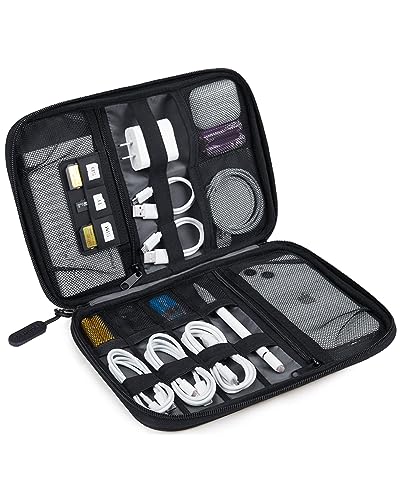
Electronic Organizer Travel Case, Small Cable Organizer Bag
Buy Now →(affiliate)
Buy a small portable drive
If you refer to sensitive documents, it is best to have a portable drive with you.
These drives are very affordable now and can easily be purchased at your local Best Buy or on Amazon (affiliate). They come in a variety of sizes. I prefer getting ones with at least 1 TB of storage, so you always have space for your business files.
To keep these digital files organized, write up a list of the folders and files you will need. Include things like the drive it is on if you have a separate server in your office. I like to keep the folder name list in the carrying case for my portable drive.
Best Deals on Solid State Portable Drives 1 TB

Portable 1TB External Hard Drive HDD by Seagate – USB 3.0
Buy Now → Buy Now →
 (affiliate)
Download offline versions of important documents before you travel, and store them on these portable drives for easy access.
Having a stand for your laptop
A portable stand that collapses when you need to travel works well, so you don’t have to work too hard with a small laptop on your desk (affiliate).
The portable laptop stand (affiliate) also helps with ergonomics, so you don’t get a stiff neck while working and traveling. These usually work on hard surfaces, such as desks or countertops.
Laptop Stand that Collapses
 Buy Now →
 (affiliate)
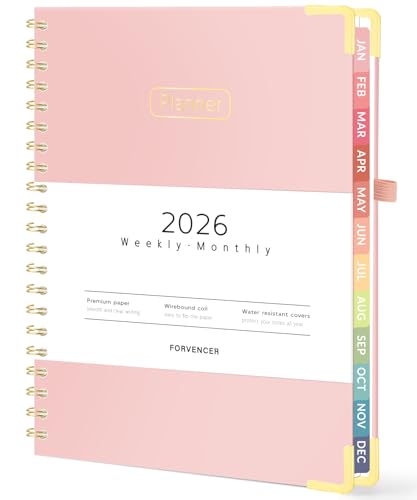
A paper planner works well for travel
We remember things better when we write them down, so using a paper planner when you travel will assist you with your tasks.
When you have a planner with you, you can easily add tasks to it while the wifi is down and make notes on upcoming appointments. Planners with a section for notes help keep you on track with projects when you are not at your office.
I had a client years ago who loved his paper planner and used highlighters (affiliate) to separate his business tasks, client work, work for his business, and personal work… It worked well for them.
Paper Planner Options
 Buy Now →
  Buy Now →
 (affiliate)
Sticky notes are your friend.
I love sticky notes (affiliate), especially with a planner. I can easily jot down a note and stick it on the day of the week I plan to do it. This works well on these travel days when wifi is spotty, and I am traveling from city to city.
Carry a Portable Mouse and Keyboard.
If you are like me, you may not like the trackpad on your laptop. It tends to make me less productive when I have to slide my finger across the pad to do simple tasks that I can click with my mouse.
And, if you have a separate keyboard at home, you may want to buy one that you can get used to while traveling. Adjusting to a laptop keyboard that you never used is an added stressor when traveling.
Pick options that are easy to connect with Bluetooth. The keyboard should be no bigger than 12 inches. Look for a portable mouse (they are smaller). That way, they will fit anywhere.
And, the keyboards and mice are so affordable now, so why not treat yourself? I treated myself to a new mouse and keyboard and am so glad I did.
Portable keyboard and mice options
 Buy Now →
Portable Logitech Pebble 2 Combo, Wireless Keyboard and Mouse
Buy Now →(affiliate)
Set clear boundaries and communicate availability to others
Keeping others informed is key when traveling. I like to tell my clients (affiliate) a week in advance via verbal, text, and email. They are busy and may forget. I don’t take it personally.
It is important to let them know when you are unavailable, such as when you are flying or in an area with no cell towers. Giving them a timeframe works well. Say something like, I will be unavailable from 9 AM to 3 PM on Tuesday. I can return your call after 3 PM Eastern Time, or whatever time zone you’re in.
A word of caution when setting up email autoresponders.
Setting up auto-responders is great for email, but be sure not to say things like, “I am away from my office,” or “I am on vacation. Stick with things like: “I am unavailable from 9 AM to 3 PM today (include date) and will get back to you when I return.”
If you have a public calendar, be sure to block the times you are in transit or unavailable so everyone can see. Again. Stick with the little details and just write unavailable. To keep you and your home safe (affiliate), stick with the wording “unavailable” for blocked hours.
If you have downtime between flights, you can inform your clients (affiliate) that you will be available specifically at those times. I like to give myself an hour before the flight as my end time.
And be sure to inform clients (affiliate) that response time may be longer than usual due to the interruptions.
Create a Mobile Office Checklist
Having a mobile office checklist (to-do list) works nicely if you travel often and move between two offices.
The ideal time to set up this mobile office checklist is when you are packing up your bag.
I found that most business owners need these items on their mobile office checklist.
- laptop chargers
- cellphone device charger
- watch charger
- international adaptors (if needed)
- portable battery pack (if needed) – TSA may require it in your carry-on, not in a checked bag. Check out the TSA app to find out what you can bring on the plane
- Pen (affiliate)
- Notepad (affiliate)/notebook
Keep a laminated checklist copy in your work bag so you can reference it easily when you return and make sure you have everything.
You may even want to keep duplicate chargers in your travel bag so you do not need to pack and unpack them. I do this, and it works well.
Use Technology for Seamless Work
Nowadays, it is easy to use cloud services to store and access files. While I prefer not to use it for private client files (affiliate), I like to use it for general documents I may need while traveling.
Some cloud storage providers are:
Some are free, and some are paid services. Visit their website for details.
Project management tools
If you work on projects with others, you may want to have these apps on your devices, such as a tablet or phone. All these apps sync across devices.
Most likely, there is a compatible mobile version of any app or software you use. To keep you synced to your files, be sure that these connections are updated.
And don’t forget to download the necessary apps before traveling in case of a poor connection.
Security while traveling
Now, let’s get down to keeping you safe (affiliate) while traveling. Never use public WiFi without a VPN for sensitive business tasks. All your digital devices, laptop, cellphone, tablet, should have VPN access for public WiFi. Norton Antivirus offers a small-business version that includes these features (affiliate).
Make sure all your business and personal logins have two-factor authentication enabled before you leave.
All your devices should have strong passwords to keep them locked. Thefts target businesspeople at airports all the time, so keep your bag close to you and never out of sight.
Get Business credit cards with benefits: Cards with special benefits work too. Look for credit cards with an airport lounge that are only for card members. This works great when you need to get away from noisy environments and have a quiet corner to focus on important, private business tasks. As I write this, below are some credit cards that offer lodge benefits are their cards:
Have a backup plan
It’s important to have a backup plan before you go. Below are some questions you can ask yourself to write one up for reference. Think of it like an emergency preparedness list for when you travel.
- What if your laptop dies?
- What if the internet connection is unavailable?
- What if you can’t access files?
- Make a list of all the important phone numbers in case your phone dies.
- How would you access your passwords if your phone is unavailable?
8 Digital Backup Strategies For Small Business
As a self-employed business owner, I know first-hand that when something happens to my computer or internet connection, my work stops. This creates quite a stressful situation, as I am unable to complete tasks for my clients and myself. So, having reliable digital backup strategies is a necessity. You may think I exaggerate, but no
7 Emergency Preparedness Backup Systems To Have In Place
As I mentioned in an earlier post, September is National Preparedness Month. This post will help you review your backup systems to ensure they are prepared for any potential issues. The summer is a great time to review your office procedures and emergency backup plans.
Time Zone Management Tips
Time zones can be tricky when traveling. A few hours to over a day can easily be frustrating for fixed business/client appointments. Here are some tips to help you with this time zone issue.
Connect with your client ahead of time to reschedule the meeting. Make sure it works for both of you.
After you determine the time, make sure you put the appointment in your device in the correct time zone for the meeting. I have had appointments that were set to the current time zone when I made them, and when I reached my new time zone, I had to adjust them again. So frustrating and confusing for my clients and me.
Be aware that your laptop may stay in the home time zone. I usually leave it that way since my clients are on the East Coast. But my cellphone will adjust to the current time zone. So, I have two different times. It works well for me. But, if you need it in the current time zone, you can adjust your laptop to show multiple time zones or the current time zone.
Depending on where you go, you can manage your time and actually have extra time in the afternoon if you decide to stay in your current time zone. I found that if I go west in the U.S., I get a few more hours in the afternoon, which lets me enjoy it more since I usually stick to East Coast time when I travel that direction.
Establish a daily routine while traveling
I like to maintain a routine while traveling to make things less stressful and help me remember everything I need to do. Below are some tips to help you determine a routine for yourself.
- Try to maintain your morning routine as much as possible.
- Identify your most productive hours and protect them for important work.
- Build in buffer time between appointments for unexpected delays.
- Schedule “time blocks for focusing” for deep work, even if they’re shorter than at home. I offer a free ebook to help you time-block.
- Group similar tasks together (emails, phone calls, content creation).
- Pre-schedule social media posts before you leave.
- Create templates for common responses.
- Front-load or delegate time-sensitive tasks before departure if you have an assistant or schedule them for emails later so they do not respond when you are unavailable.
Manage your energy level, not just your time.
You may feel out of sorts when traveling – A disrupted sleep schedule or not eating well – I hear you. It happens to me all the time. But there are ways to preserve your energy. Check out the tips below.
- Add time breaks between productive work and important meetings/sessions, 15 minutes works great between meetings.
- Drink water – travel makes you dehydrated, and it will affect productivity.
- Don’t overschedule your time – travel is tiresome, so make sure you do not overschedule your meetings with clients.
- If you have a long flight time, plan lighter workdays right after it. You will need to add time to account for jet lag.
- Know that you can say no to new projects while traveling. It may feel easy to add, but if you already have an established schedule and have to add something new, you may want to take a break and tell them you will do it when you return.
- Invest in noise-canceling headphones (affiliate) to help you stay focused and sleep during the long trips.
- Keep some healthy snacks (affiliate) in your bag for energy between meals. This is especially helpful for people with food intolerances, since food contamination can drain energy.
- Remember to give yourself some grace; you won’t be productive all the time, and that is okay, too.
- Keep your fitness routine as close as possible to your regular schedule – if you work out in the morning after you wake up, stick with that routine when traveling.
Remember: you will need to handle everything, so taking time to manage your energy will go a long way toward keeping you on track with the tasks you already have assigned.
Expense Tracking on the Go Tips
If you need to bill for expenses, it’s important to establish a system before you travel. Ask yourself these questions.
- Where will I place my paper receipts?
- Where will I store my digital receipts? Do I need to keep them in jpeg or PDF format?
- Will I update my receipts in an invoice while I am traveling, or will I do it when I return?
- Do I need to track meals? Will I be having meetings with clients? Who will be paying?
All these questions and more slow down how quickly you can bill clients.
Keeping a small envelope (affiliate) in your bag for receipt papers works well. This can also be an envelope (affiliate) in the back of your planner.
Using QuickBooks Online, FreshBooks (affiliate), or Expensify to take pictures of your receipts immediately works too. I even found the Tiny Scanner app, which creates PDF versions of the receipts and stores them in Google Drive for later access, works nicely.
Check out how I created my free digital receipt organization ebook, where you can store these receipts in this file structure and add it to your solid-state portable drive.
Driving for Business Tips
If you drive for your business, keeping your car’s interior organized is really important. I touched upon this in my other posts. To be more productive while traveling, below are some brief tips.
- Divide the car into sections.
- Everything should have a place.
- A portable file box (affiliate) for papers works well. Store them in the trunk.
- Install a car trash can (affiliate).
Feel free to visit them below for more details.
How to Organize Your Work Vehicle
Did you ever lose something in your car that you need for your meeting tomorrow? Digging under the seat, you find random items, combs, empty wrappers, etc., but not the lost thing. Business owners who frequently use their cars for work can run into problems if their vehicles are disorganized.

Seasonal Summer Business Steps Prior to Busy Season
Some years ago, I worked with a food truck business owner who had super-busy summers, and we found it tough for them to stay organized when they were going from event to event in one weekend. So, to help them, we implemented several processes.
Post – Travel Follow-up Tips
Now that you have returned home, it is important to have a system to put everything away so nothing gets lost.
I like to use plastic folders(affiliate) for business and personal papers. One for my business papers and one for my personal papers. It could even be an accordion folder with 5 tabs (affiliate), so it doesn’t take up too much space in your carry-on bag (affiliate). These folders have a cover to keep the paper items from falling out.
Schedule a light day the day after you return. Don’t overschedule your first day in the office. There are things you need to do, and you may be jet-lagged.
Revisit the process you have in place. Now is the time to revisit what worked and what didn’t, so you can adjust before you forget. Update paper files, products you used that didn’t work, and items that weren’t placed in the correct location for when you needed them while traveling are all areas to revisit. Be sure to update your travel checklist on what you have learned.
Remember, if there are travel items you didn’t need for anything other than travel, keep them in the bag you travel with. For example, I have a water bottle that I use only for travel. After it is washed and dried, it is stored back in the carry-on bag for the next trip. Easy peasy!
Closing
Traveling while running a business doesn’t have to derail your productivity. With the right systems in place, you can maintain momentum and even discover that a change of scenery boosts your creativity. The key is preparation, flexibility, and knowing yourself well enough to set realistic expectations.
If you need help creating a productive traveling checklist or need help to get more organized when traveling, please check out my Small Business Virtual Consultations Service. I hope this post helps you stay productive while you are traveling.
Related Posts:








Leave a Reply