Every small business has supplies it needs and uses repeatedly. Printer cartridges, printer paper (affiliate), copier paper, pens (affiliate), staples, supplies for products sold, supplies for services performed, etc. To help make your office more efficient, why not create a list of your business’s frequently used supplies? Here is how to make a simple, frequently used supply list for your small business that I have used over the years. The paper version is great for solopreneurs and service-based microbusinesses. When a small business needs a lot more supplies, this system may be more time-consuming to use. They may want to use a more automated app to help them manage their frequently used supplies. So, I will be sharing apps to help with that as well. Let’s begin.
Topics
What supplies need to be on this list?
First, decide which supplies you use most often. Do this by taking a stack of Post-its and sticking them to each supply you use and replace often.
Then go around and make a list of all the items that you frequently use. To help you generate ideas for your list, I created one for solopreneurs. See below.
Frequently Used Supplies List for Solopreneurs
Below is an example of things that a solopreneur may have on their frequently used supplies list.
Paper & Printing
- Printer paper (affiliate) (letter size)
- Printer ink or toner cartridges
- Cardstock (for business cards (affiliate), thank-you cards, signs)
- Photo paper (if you print marketing materials)
- Shipping labels (affiliate) and address labels (affiliate)
- Sticky notes (affiliate) / Post-its (various sizes)
- Notepads (affiliate) or legal pads
Writing & Desk Tools
- Pens (affiliate) (black, blue, red)
- Highlighters (affiliate)
- Permanent markers (Sharpies)
- Dry-erase markers
- Pencils (affiliate) and erasers
- Whiteout/correction tape (affiliate)
Filing & Organization
- File folders (manila and hanging)
- Binders and binder dividers
- Sheet protectors (affiliate)
- Labels (affiliate) (file, mailing, return address)
- Paper clips and binder clips
- Rubber bands
- Index cards
Mailing & Shipping
- Envelopes (affiliate) (#10 business, manila, padded)
- Stamps
- Shipping boxes (assorted sizes)
- Bubble mailers or poly mailers
- Packing tape (affiliate) and tape (affiliate) dispenser
- Bubble wrap or void fill
- Thank-you notes or inserts for client packages
Tech & Workspace
- USB drives (affiliate) or SD cards
- HDMI / USB-C cables and adapters
- Phone and laptop chargers (backups)
- Batteries (AA, AAA, button)
- Surge protector or power strip
- Webcam cover/ring (affiliate) light bulbs
- External hard drive (for backups)
Cleaning & Breakroom
- Disinfecting wipes
- Microfiber cloths (for screens)
- Hand sanitizer
- Tissues
- Paper towels (affiliate)
- Trash bags
- Coffee (affiliate), tea (affiliate), creamer, sweetener
- Bottled water or filter replacements
Client-Facing & Branding
- Business cards (affiliate)
- Branded folders or pocket envelopes (affiliate)
- Promotional items (pens (affiliate), magnets, stickers)
- Gift cards or small client gifts
- Receipt books (if you accept cash/check)
Health & Comfort
- Reading glasses or blue-light glasses
- Hand cream (paper dries out hands fast!)
- Throat lozenges (helpful before calls or video meetings)
- Pain reliever (basic first-aid kit)
- Eye drops
Industry-Specific Add-Ons
Depending on your business, also consider:
- Service-based: Contracts, invoices, intake forms, receipt books
- Product-based: Tissue paper, ribbon, branded stickers, packing slips
- Creative/Photography: Memory cards, lens wipes, props, backdrops
- Bookkeeping/Admin: Calculator (affiliate), paper rolls, accordion files, year-end storage boxes
- Event/Mobile: Tablecloths, signage, clipboard, cash box
A good rule is that if you reorder it more than twice, it should be added to your list of frequently used supplies.

If you want to get an already-made copy of this Solopreneur list, please feel free to sign up for my newsletter below. I do not sell your email.
Solopreneur Frequently Used Supply List
You are signing up for our newsletter to get a copy of our How to Create A Solopreneur Frequently Used Supply List from our post “How To Create A Business Frequently Used Supply List”.
Keeping the Business Brand Consistent is Key to Brand Awareness!
Deluxe offers everything from office supplies to customized products. You may need to do just that, including eco-friendly options!
Check them out today for the best deals!


Tips to Manage Your Frequently Used Supply List
Below are tips for managing your frequently used supply list.
Set a reorder threshold for each item
Next to each supply on your list, write a “reorder when you have X left” number. For example, reorder printer paper (affiliate) when you’re down to one ream, or order toner when the spare cartridge is opened. This prevents the panic of running out mid-project and keeps you from over-ordering “just in case.”
Reorder _____ when down to ______ items.
Assign one person to own the list
If more than one person uses supplies, designate a single point person to monitor (affiliate) and reorder. When everyone is responsible, no one is — and you end up with three boxes of staples and zero pens. Rotate this role quarterly to share the load.
Note your preferred vendor and SKU
Add a column for where you buy each item and the exact product number or link. This saves time hunting down “that specific pen (affiliate) you liked” and makes it easy for someone else to reorder if you’re out of the office. This can change depending on the store you purchase from, what you need, and deals that are going on.
Track price changes
Once or twice a year, compare current prices to what you paid last time. Office supply prices creep up quietly, and a 15-minute review can flag items where switching vendors or buying in bulk saves real money.
Separate “must-have” from “nice-to-have.”
Mark essentials (printer ink, invoices, shipping labels) differently from preference items (a specific brand of sticky note). When budgets get tight, you’ll know instantly what can wait and what cannot.
Review the list seasonally
Your supply needs may shift throughout the year — tax season, holiday shipping, back-to-school, and year-end reporting. A quick quarterly review keeps the list accurate instead of letting it go stale.
Keep a small backup stash
For your top three critical items, keep one extra on hand at all times. Tuck it away in a separate location from the main supply area so it doesn’t get used accidentally. It’s cheap insurance against shipping delays.
Go paperless where it makes sense
Before reordering, ask whether you still need the physical version. Switching to digital invoices, e-signatures, or cloud-based notes can shrink your supply list and save storage space, too.
Decide how much to buy and how often to buy them.
Now, write down how much you buy of those supplies. By visiting older orders, you can determine the right quantity you will need.
Review the receipts for the supplies you have and determine how often you buy these items. If you track your itemized supplies and know where they come from, you can look at your bank register in QuickBooks or Quicken (affiliate) to get a better idea of how often you buy the supply item. You can also pull the shipping slips or receipts.
How to manage the list of frequently used supplies?
I like to use a table to track this information since mine is pretty small of a list. Be sure to add a check box next to each item to help check off what you need. Though you can also use an app. I will discuss that later.
For the paper list, I will give you the steps below.
Review the list with others
Now it is time to allow others to review the list. Print out the list and have other employees who may add to it review it. This way, they can give you feedback on items that you may have missed. Making modifications as needed will demonstrate that you are incorporating the other employees’ suggestions into the frequently used supply list.
Now print and post it.
After the list is complete, print it, laminate it, and hang it in a visible place. Attach a dry-erase marker to the laminated paper.
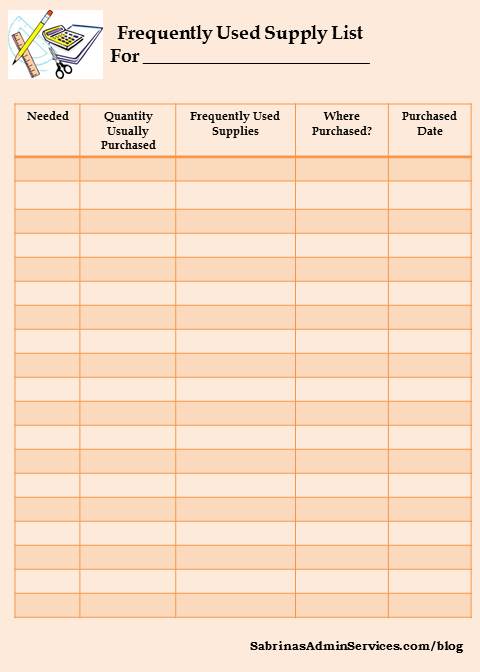
Here is an example I created that is generic for any business starting out and available for free.
The columns in this sheet are as follows:
- Checkbox for needed items
- Quantity used or purchased – write quantity taken away or added to the item.
- Frequently used supplies name – Add the name of the item
- Where purchased – add the store name.
- Last purchased date – add the date last purchased
If you laminate this page, you can easily use a fine-tip dry-erase marker to write and erase what supplies are left.
Apps to Help You Track Frequently Used Supplies
A paper supply list works great, but if your business uses a lot of supplies — or you have a team adding to it — an app can make tracking even easier. Many include barcode scanning, low-stock alerts, and shared access so everyone is on the same page. Here are some options:
Google Sheets or Microsoft Excel — Don’t overlook it! A shared spreadsheet with conditional formatting (to highlight low-stock items in red) works beautifully for very small teams and costs nothing. Pair it with Google Forms so employees can submit “we’re running low” notes from their phones.
If you prefer a digital copy, share the file in a shared folder so all employees know where it is and can access it to add quantities as needed.
Sortly — A favorite among small businesses thanks to its visual, photo-based interface. You can scan barcodes with your phone, set low-stock alerts, and add custom fields. Offers a free plan with limited items, with paid plans starting around $29/month.
Zoho Inventory — A solid all-around choice, especially if you already use other Zoho apps or QuickBooks. Includes barcode scanning, multi-channel selling, and reorder alerts. Free plan available; paid plans start around $29/month.
inFlow Inventory — Best if you want a more robust system with vendor tracking, purchase orders, and team management. The mobile app pairs with your account so you can scan and update from anywhere. Plans start around $89/month.
Square for Retail — A great pick if you already use Square for payments. Inventory features sync directly with your POS, so usage updates automatically when you sell. Free basic plan available.
Jotform (with Inventory Templates) — If you’re already using Jotform for client forms, you can build a custom supply tracker using their templates and tables. Free plan available; paid plans start around $29/month annually.
Keep in mind that the app versions will take a little time to learn so allocate a good amount of time before using the selected app.
How to choose the right app for my business?
Ask yourself these questions:
- How many items am I tracking? Under 50 items? A spreadsheet or free app like Sortly’s free tier is plenty.
- Will my team use it too? Pick something with a clean mobile app and shared access.
- Do I need it to connect with my accounting software? If so, look at Zoho Inventory or inFlow (both integrate with QuickBooks).
- What’s my budget? Start free and upgrade only when you outgrow it.
The best app is the one you’ll actually open and update. Start simple — you can always switch later as your business grows.
Closing
I hope this helps you save money and not overspend on these supplies. Even though you use them often, it doesn’t mean you need to buy a lot of them. By tracking these supplies, you will better understand your expenses and when you buy them. So, try it out and see if it saves you time and money.
Need help making your frequently used supply list? Check out my Virtual Consultation services.
Related Posts: