Occasionally, I receive unclear emails and struggle to understand what the sender means. Sometimes, the subject line is vague; at other times, the email’s content is unclear. As a result, this creates confusion and frustration on both sides of the conversation—sad news for the email’s sender. =( I know I don’t like it when I am misunderstood or don’t get a response. To help you communicate more clearly by email, I am sharing practical email communication tips and questions to ask yourself before sending an email. I hope it helps you and your business be more productive.
I keep updating this post because a lot has changed about how we all use email; this round adds AI drafting tools, scam red flags, and a few habits that matter more once you’re not the only person checking the inbox.
Estimated reading time: 11 minutes
Key Takeaways
- Clear email communication reduces confusion and frustration for both the sender and recipient.
- Before sending an email, ask yourself questions about the subject line, recipients, and content to ensure clarity.
- Use bullet points or numbered lists for questions in emails to improve readability.
- Follow-up emails should be polite and may simply ask for a response, acknowledging the recipient’s busyness.
- Even short replies should convey meaningful information to support understanding and respect in communication.
Topics
- Questions To Ask Before Sending An Email
- Updated for 2026
- Let AI Help You Draft, But Don’t Let It Hit Send
- Watch for Scam Red Flags: Small Businesses Are a Target Too
- Batch Your Email Checking Instead of Reacting All Day
- If You Have Any Team Members, Set Shared Email Norms
- Follow-Up Emails Example Sentences
- Quick response examples
- FAQs
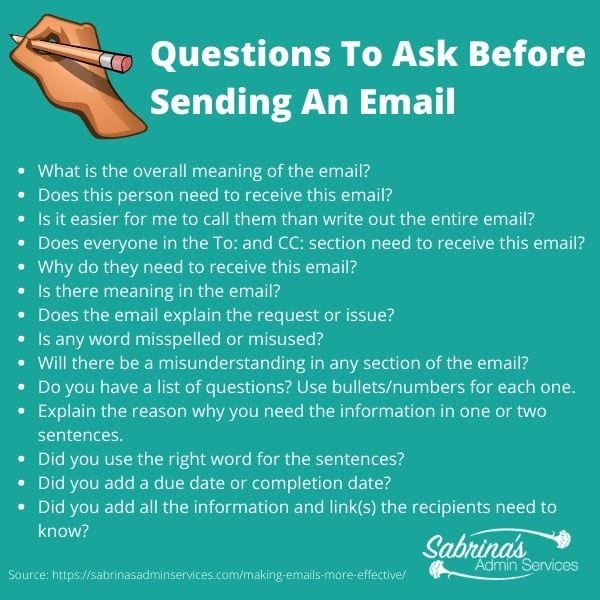
To prevent confusion, I take a few minutes after drafting an email to read it over and ask myself these questions to make sure what I am sending makes sense. Here are questions to ask before sending your email.
Questions To Ask Before Sending An Email
1. Question to ask yourself about the Subject line:
- What is the overall meaning of the email? Emails may be deleted by accident if the subject line is too vague.
2. Questions to ask yourself about the To: and CC: section line:
- Does this person need to receive this email? Is it easier to call them than write the entire email?
- Does everyone in the To: and CC: sections need to receive this email?
- Why do they need to receive this email?
3. Questions to ask after writing the content of an effective email:
- Most important: Reread emails before sending them. Is there meaning in the email? Does the email explain the request or issue?
- Is any word misspelled or misused? Could any section of the email be misunderstood? Missing commas or misspelled words can create an entirely different message. We wouldn’t want that, especially in a business email. Use apps like Grammarly.
- If you have several questions, use bullets or numbers for each one. Make the questions short and to the point. Explain the reason why you need the information in one or two sentences.
- Set up the automatic spell checker to check emails before you send them. This feature will catch 95% of spelling errors.
- Did you use the right word in the sentences? The Grammarly app may help you with that! You can even install it on your Microsoft Outlook.
- When you request information from the recipient, include a due date or completion date. This helps them know when to finish the project. If you don’t have a due date, indicate that there’s no rush. This step will help people who tend to do things right away avoid focusing too much on the requested task.
- Include all the information and link(s) the recipient needs to know. Missing data will only prolong the requested information.
Updated for 2026
I had to add to this list of questions because things have changed, and we are extremely overstimulated by email. So, follow these tips in addition to the ones above.
- Don’t bury the lead. Keep what you want front and center in your post. So, ask what you want first, then explain why later.
- Keep emails short. If it is too complicated to express in a short email, schedule a Zoom meet-up. Then you can use a transcriber to help you track what is discussed.
Tip: Determine what day of the week and time of day will work most efficiently for your recipient to receive and respond to emails.
They may check their email only once a day, once a week, or only on weekends. They may check it only at 9:00 or at lunchtime. This step will help you decide when to send a request and when a response is likely. Read more about Quick Tips For More Effective Time With Email.
Let AI Help You Draft, But Don’t Let It Hit Send
By now, most of us have an AI assistant built right into our inbox — Copilot in Outlook, Gemini in Gmail, or a tool like Grammarly’s AI features layered on top. Used well, these tools are genuinely helpful: they can summarize a long thread you’re behind on, draft a first pass at a reply in your voice, or suggest a clearer way to phrase something you’ve rewritten three times.
Here’s the rule I follow, and the one I’d recommend to any solopreneur: drafts get staged, never sent.
Let AI get you 80% of the way there, then read it yourself before it goes out. The same way you’d reread any email using the questions earlier in this post.
AI still misses context, gets a client’s name or a due date wrong, or lands a tone that doesn’t sound like you.
A wrong reply sent on autopilot costs a lot more than the few seconds it takes to double-check it.
Tip: If your AI tool lets you feed it your own canned responses or past emails, do it. It’ll draft in a voice closer to yours instead of a generic one, which means less editing for you in the long run.
Watch for Scam Red Flags: Small Businesses Are a Target Too
It’s tempting to think email scams only target big companies, but the data doesn’t show that. Businesses with fewer than 1,000 employees face regular attempts at Business Email Compromise (BEC); the fake-invoice, fake-vendor, “urgent wire transfer” kind of scam, and the average fraudulent wire request lands around $24,586 per incident, according to Hoxhunt’s 2026 BEC research.
I have found several emails coming to me from me (weird write). Clearly, scammers are not doing their due diligence.
As a solopreneur or small business owner, you’re often the only person checking that inbox and approving that payment, which makes you a more efficient target, not a less likely one.
A few habits that catch most of these before they cause damage:
- Slow down on anything urgent involving money, login credentials, or a “changed” bank account or vendor detail; urgency is the scam’s whole strategy.
- Verify requests to change payment details or wire funds by calling a number you already have on file, not one in the email.
- Double-check the sender’s actual email address, not just the display name. A lookalike domain is one of the easiest tricks to miss on a phone screen.
- If an email “from” a client or vendor sounds off different tone, different signature, oddly formal or oddly casual- trust that instinct and confirm another way before you act on it.
Want a second set of eyes on your process? If sorting real requests from suspicious ones is one more thing competing for your attention, it’s exactly the kind of workflow I help clients (affiliate) document and tighten up through Recurring Admin Services, from verification steps to who’s allowed to approve what. Let’s talk about building a process that protects your business without slowing you down.
Batch Your Email Checking Instead of Reacting All Day
I batch my social media scheduling instead of posting in the moment, and I’ve found the same approach works well for email.
Checking your inbox every time a notification pops up trains you (and your brain) to be reactive all day instead of doing focused work.
Instead, pick two or three set times a day to process email: morning, after lunch, and before you close up shop and let everything else wait.
This isn’t about responding more slowly; it’s about being more intentional. Most of the people emailing you aren’t expecting an instant reply anyway (see the “Updated for 2026” tip above about when your recipient actually checks their inbox). If something is truly urgent, people know to call or text, so it’s worth saying that in your email signature or autoresponder if you haven’t already.
If You Have Any Team Members, Set Shared Email Norms
This post is written mostly for solopreneurs, but plenty of you have grown to a small team of a few people, and email habits get messier fast once more than one person is answering the same inbox or representing your brand in writing. A few things worth putting in writing, even if it’s just a one-page document:
- A shared response-time expectation (same business day, within 24 hours, etc.) so clients (affiliate) get a consistent experience no matter who replies.
- A couple of approved templates for your most common emails, so tone and phrasing stay consistent across the team.
- A simple escalation rule for who forwards what to whom when a request is outside their lane.
Documenting this once saves you from answering the same “how do I word this?” question repeatedly, and it’s one of the simplest process-improvement wins for a growing business.
Follow-Up Emails Example Sentences
Follow-up emails can be tricky, but they do not have to be. Remember, the person may not ignore you; they may just be busy and unable to respond. Below are some follow-up statements you can incorporate into your follow-up email.
- I do not think I received a response. No problem, here is the …. for our next meeting. Let me know if that works for you.
- If you replied to my prior email, I may have overlooked it. Please resend it. Thank you.
- My apologies; I fear I may have missed your response. Please reply when you have a moment on the ______ topic.
All these statements are positive, apologetic, and practical, not critical of the other person.
Quick response examples
If you reply to someone’s email, add a few more words than “Thanks” or “OK.” Adding additional details to clarify what you are replying to works well. Below are some further examples of sentences you can use.
- I appreciate your help with this….
- I understand. I will do …. next (day date).
- That sounds good. I will do it on (day).
- OK, I have modified … today.
Taking the time to clarify your quick responses shows you are a clear communicator and that you respect the other person’s time.
Making your emails more effective is respectful to the recipient, whether it is a colleague, potential client, or current client. In college, my English Professor always told me to “write not for you but for the reader and write how you would speak to someone who does not know you or what you are talking about.” Your writing becomes clearer and more efficient when you write this way. I hope this post helps you create an effective email.
What is your pet peeve when writing or receiving emails? Please leave a comment below. I would love to hear from you.
FAQs
Yes, as a starting point. Use AI to draft a first pass, summarize a long thread, or clean up phrasing; but always review and personalize it before sending. A reply that sounds generic or gets a detail wrong can do more damage than a slightly slower, human-written one.
Be suspicious of urgency, a request to change payment or bank details, and small differences in the sender’s actual email address.
Verify any request involving money or credentials with a phone call to a number you already have on file; never one provided in the email itself.
There’s no universal rule, but batching your inbox two or three times a day (rather than checking constantly) is generally more productive than reacting to every notification.
Let your email signature or autoresponder tell people how to reach you for anything truly urgent.
Send a short, polite follow-up that assumes the best: that they’re busy, not ignoring you. Restate what you need and offer an easy way to respond, rather than asking “did you see my email?”
It helps more than you’d expect. Even a simple one-pager covering response-time expectations, a couple of approved templates, and who handles what prevents inconsistent replies and repeated questions as your team grows.
Visit these additional posts from other experts.
25 Tips for Perfecting Your E-mail Etiquette – Inc Magazine
10 Tips For Better Business Writing – Forbes
What is your pet peeve when writing or receiving emails? Please leave a comment below. I would love to hear from you.
Related topics:
Please note these are affiliate links through Amazon (affiliate), and at no additional cost to you, I will earn affiliate fees if you decide to make a purchase.







Great tips here!
I especially like the quote from your professor: When you write, write for the reader. I saw this same concept somewhere and it’s made a huge difference in my writing. As a writer, it helps me take a step back and cut or revise where needed – instead of just saying this is the way it makes sense to me and/or that’s the correct way to do it. If a person has problems understanding it, it doesn’t matter what’s grammatically correct.
Sorry. I’m rambling. Again great post!
As someone with a Speech Communication degree and who teaches and writes about communication skills, I couldn’t agree more.