All startups and established service businesses evolve. And so do websites. As your company grows, updating your website’s services page is key to capturing new potential clients (affiliate). Otherwise, the website’s service pages may be left in the dust. This results in frustrated potential clients (affiliate) missed leads, and angry customers. There may be new services and processes for existing services that are not yet on the website because they have started recently.
In recent years, we started seeing a pattern where websites would not update their service statuses or business hours, even when they were closed, still showing as open. You may be thinking, but why do I need to do this right now? There are many benefits to updating your website’s services pages. Please read on to find out.
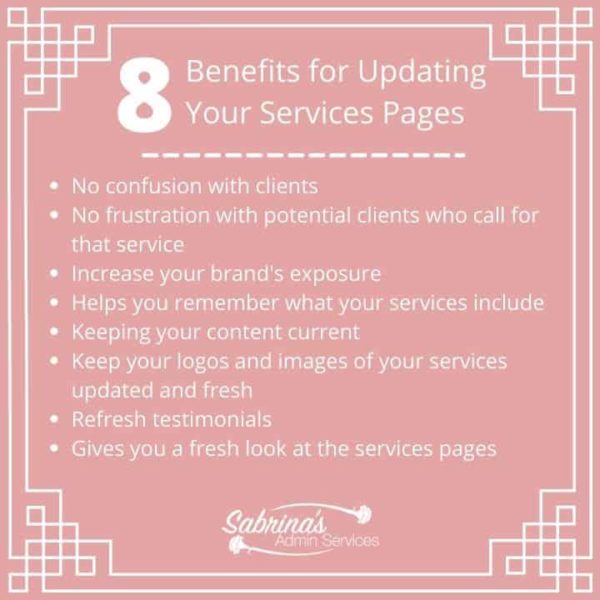
Benefits of Updating Your Sm Business Website Services Pages
- No confusion with clients
- No frustration with potential clients who call for that service
- Increase your brand’s exposure.
- It helps you remember what your services include.
- Keeping your content current
- Keep your logos and images of your services updated and fresh
- Refresh testimonials
- It gives you a fresh look at the service pages.
- How should I update my website services pages?
- First, print out the pages on paper.
- Mark up the pages with all your adjustments.
- Update or have someone update the pages on the website for you.
Key Takeaways
- Regularly updating your website’s services page keeps potential clients (affiliate) informed and reduces confusion.
- Updated services pages improve SEO (affiliate), helping your site rank higher in search results.
- Refreshing content helps you remember service details and ensures accurate information for clients.
- Use printed pages to note adjustments, and update them online step-by-step for better organization.
- Promote your updated services page through social media and email to reach more potential clients.
No confusion with clients
Potential and existing clients do not want to misunderstand any additional services you may offer or have just added.
No frustration with potential clients who call for that service
It makes it easier to explain services by email because you can email them the updated services page.
Increase your brand’s exposure.
When you update these pages, you can push your services up the search engine rankings, as search engines love updated pages.
It helps you remember what your services include.
When creating new services, we may only have one or two clients doing that service, so writing it out and sharing it on your services page allows you to see the big picture and determine the details and why potential clients would love to use them.
Keeping your content current
Some services may change their title or keywords, resulting in outdated services and not getting enough of the right keywords to generate leads.
Keep your logos and images of your services updated and fresh
If images for these service pages are older and not of the quality available on sites now, they can look less professional, resulting in missed opportunities. You may notice missing items your potential client might want to use.
Refresh testimonials
Some testimonials on services pages may be about other services, which can confuse potential clients. Updating the services pages with fresh new reviews will give them life.
It gives you a fresh look at the service pages.
It is essential to view the services pages from a “potential client” perspective. Ask yourself questions like, who is my ideal client? What would they want when looking at my services? Is there a reason they would visit this services page?
How should I update my website services pages?
Now that you see the importance of updating your service pages let’s help you get started.
First, print out the pages on paper.
Printing it out on paper will help you jot down notes and make adjustments to the content. Note that this may result in many printed pages, depending on the size of the service page.
Mark up the pages with all your adjustments.
Writing down things like “make a new featured image” will help you remember the changes you want to make online.
Update or have someone update the pages on the website for you.
If you can do it yourself, update each service page one at a time. Complete the SEO (affiliate) information and new images. Log in to your account and go to the appropriate services page to update. Work on one at a time to finish the different services. Also, make sure that the updated page has a working form.
If you need help updating the content for your service website, we can help! Feel free to check out our small business’s website for help and maintenance services. We offer a retainer service in which each month we help you optimize your posts for SEO (affiliate), update images, and keep on top of small-business website tasks. Reach out, and we can discuss your specific needs.
Remember to share the services page on social media and email it to your mailing list. This will give people a new perspective on your services and remind them that you are still ready to serve them.
I hope this post inspires you to update your website services pages as soon as possible. You will be grateful for doing this when new clients start rolling in and adding to your small business’s income.
Related Posts!
Below are additional posts that will help you update your website to attract potential followers.
Ways to Update Your Business Website Now
6 Pages a Small Business Services Website Needs
How to Layout Your Small Business Services Website
7 Important Questions To Ask About Your Services
Please note these are affiliate links through Amazon (affiliate), and at no additional cost to you, I will earn an affiliate commission if you click through and decide to make a purchase.







I’m in the process of redoing my website, and I’ve saved the Service page for last – partly because, as you say, our services and the way we deliver them change fairly often, and I want it to be as current as possible when I publish it. Great tips!
Thanks for stopping by and commenting, Janet! Good luck on updating your services pages. =)