While visiting some local service-based small-business websites, I noticed a common mistake across several industries in the small-business service provider sector. Small Business Service Owners feature various elements on their websites, including expertise, testimonials, and portfolios. However, one critical aspect is missing: the service area. With all the spam and bots targeting our industries over the years, many business owners do not include their service area on their website. This is a deterrent to anyone who wants to learn more about a service in their area, resulting in lost revenue and clients (affiliate).
Let’s correct that! Today, I will discuss the service-based Small Business Service Area on the website and explain why it should be prominently featured. This seemingly simple addition can have a dramatic impact on your local business’s search visibility and customer retrieval.
Topics
- Quick Answer: Why Your Service Area Matters
- Benefits of sharing your service area on your business website
- Where should the Small Business Service Area be on the website?
- What should I include in my Service Area section?
- Common mistakes small business owners make with service area pages
- How virtual and hybrid businesses should handle service area
- Frequently Asked Questions
- Conclusion
Key Takeaways
- Clearly listing your Small Business Service Area on your website enhances local SEO (affiliate) and builds trust with potential clients (affiliate).
- A service area identifies the geographic region where services are available, preventing inquiries from outside that region.
- Prominently feature your service area on your homepage, footer, and dedicated Service Area pages for better visibility.
- Avoid common mistakes like keyword stuffing and failing to update your service area as your business expands.
- For virtual businesses, explicitly state both your local and remote service areas to improve clarity for search engines and prospects.
Quick Answer: Why Your Service Area Matters
A small business service area is the geographic region where you provide your services. Listing it clearly on your website helps search engines match you with local prospects, builds trust with visitors, improves your ranking in “near me” searches, and prevents wasted inquiries from people outside your coverage zone. Whether you serve a single ZIP code, multiple counties, or work virtually across the U.S., your service area should appear in your footer, on your homepage, on a dedicated Service Area page, and inside your meta descriptions.
Benefits of sharing your service area on your business website
We forget that when people visit our site for a service, we need to provide clear information to avoid confusion. Below are the benefits of sharing your service-based business area on your website.
Get the right people in your area.
People may be confused if they are not aware of their location on their phone. Publishing your service area helps search engines know your specific geographic areas. If they do not share that on their device with the Android browser or iOS browser, you may be receiving visitors who are not in your area of service, resulting in wasted time for you and the prospect. By focusing on the service area, you increase your visibility in “near me” searches and local search rankings.
Think about it from the prospect’s side: if someone in Norristown searches “virtual bookkeeper near me,” Google has to decide which businesses to surface. When your site clearly says you serve Montgomery County, PA, the algorithm has the data it needs to choose you over a vague competitor. Without that data, you’re invisible to the very people most likely to hire you.
Help the search engines know who you are.
When a search engine visits your site, it is essential to list the areas you serve, as this provides it with information about your business and helps prospects find you. Search engines use this, combined with your Google Business Profile, NAP (Name, Address, Phone) consistency across the web, and schema markup to build a complete picture of your business. The more consistent and specific your location signals, the more confidently Google can rank you for local queries.
Building trust and credibility
Being transparent with others will help with trust. People do not want to guess who you are and your service area. It’s a waste of time, and they may not even want to act. It is best to have no confusion about your service area. It also shows you are professional and value the user experience, and can build trust with prospects. A clear service area also signals that you’re an established, accessible business—not a fly-by-night operation or an out-of-state lead generator masquerading as local.
Content marketing resource for your website
If you decide to create a blog, you can start writing about your area, including topics such as local market events, local community partnerships, area-specific challenges your business solves, or local customer success stories. This will boost your services in your area and help your prospects find you more quickly. It will also help build a community in your immediate area.
Some easy local content ideas to get you started: a “Best of [Your Town]” roundup featuring local businesses you partner with, a guide to local regulations that affect your industry, seasonal tips tailored to your region’s climate, or interviews with neighborhood business owners. Each of these creates additional location-rich content that reinforces your geographic relevance.
Competitive Positioning
Highlighting your local area can help you stand out from the crowd. You can emphasize your local keywords, regulations, specific requirements in your area, and preferences that the bigger companies might overlook. National brands rarely speak to local nuance—use that to your advantage. Mention the local township ordinances you understand, the regional weather patterns you account for, or the neighborhood preferences you accommodate.
If you feel these benefits are essential, check out these tips to help you place your small business service area on your website.
Where should the Small Business Service Area be on the website?
We need to talk about the placement of this information. There are many best practices for including this information. Below are some of the best ways to add geographic locations to your website.
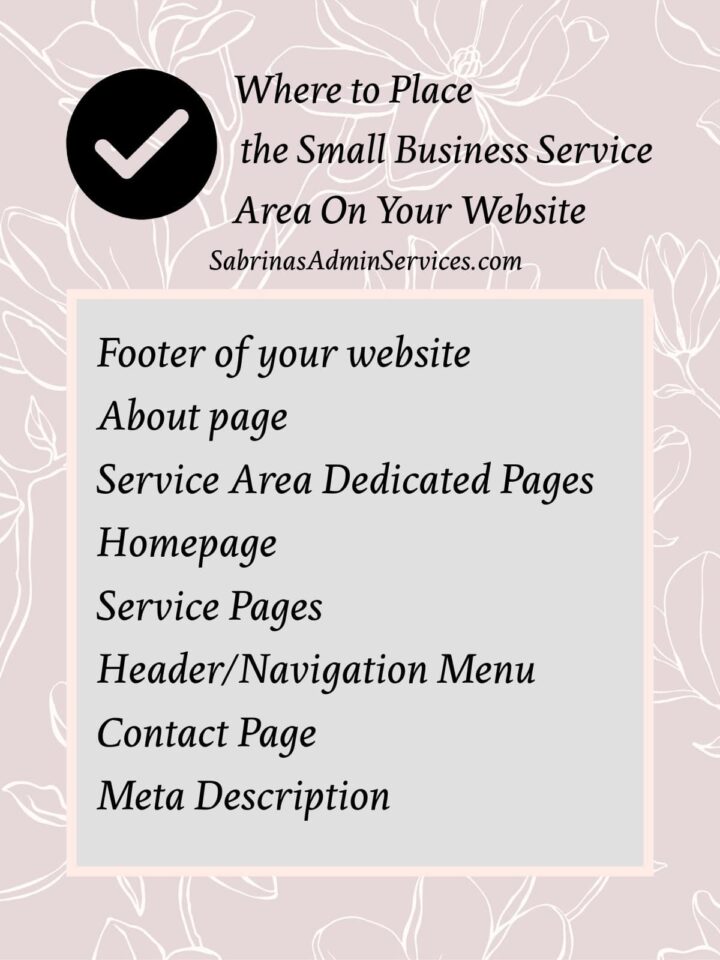
- Footer of your website: Share detailed information like the business address and the physical address. This area makes it visible on every page of your website.
- About page: You should have an About Us or About Me page. If you do, include your service area on this page as well.
- Have a Service Area Dedicated Pages: Create a separate services page that shows a wide range of specific location pages. Include things like a map and a list of cities, counties, or regions, if you have several locations or have a chain of physical storefront. This also helps the user and search engine optimization (SEO).
- Homepage: You cannot forget the homepage, as most people will land on it. This section should be the large, prominent area at the top of the homepage.
- Service pages: If you have several detailed services, as I do, you may need to include a section on each page that describes your service area.
- Header/Navigation Menu: Include a “Service Areas” link in your main navigation. This immediately tells both users and search engines that the location matters to your business.
- Contact Page: Be sure to include your service area on the contact page as well, preferably before the form.
- Meta Description: When setting up the SEO (affiliate) for your services page, be sure to add that the business serves cities in this area.
Make sure the placement is visible to your target audience and easily accessible to them. Placing it naturally where people would be looking for the information works best. It is also OK to have it repeated several times throughout your site.
Other Things to Consider
Below are some additional tips you can use to improve geographic optimization. Below are some extra ideas to try.
Create a city-specific page name.
Additionally, consider creating location-specific landing pages for your primary service areas. A page titled “________ Services in [City Name]” will perform better in local search engine optimization than a generic service page. If you service several areas, you can create a service page for the leading metropolitan area.
Include specific names for these city-specific pages.
Include local landmarks, neighborhood names, and area-specific information to strengthen your local relevance. If you are in a major city, be sure to include the names that the local customers would use.
Keep up-to-date with Google Business Profile.
And, don’t forget about your Google My Business Profile and other local directories. Ensure your service area information is consistent across all platforms. Other places to visit are Angi.com, Thumbtack.com, and Yelp.com. Be sure to update your social media company profile as well.
Add LocalBusiness schema markup.
If you’re comfortable with a bit of code (or use a plugin like Yoast SEO Premium or RankMath), add LocalBusiness schema markup to your site. This is structured data that explicitly tells search engines your business name, address, phone number, and service area in a format they can read with zero ambiguity. The “areaServed” property is specifically designed for service-area businesses.
What should I include in my Service Area section?
Share information with your visitors just by including the exact cities, zip codes, neighborhoods, and regions you serve. It is OK to be extremely detailed in your city’s names.
Here’s a checklist of what a strong Service Area section should contain:
- A clear opening sentence stating the primary region you serve (e.g., “We proudly serve solopreneurs throughout Southeastern Pennsylvania”).
- A list of specific cities, townships, or boroughs—use the names locals actually use.
- ZIP codes if you serve a tightly defined area or want to rank for ZIP-code-based searches.
- County names, which often appear in regional searches.
- A Google Map embed showing your coverage area.
- A note about virtual or remote service options, if applicable.
- A clear call-to-action (“Not sure if we serve your area? Contact us!”).
You can also include a Google Map that shows your service area. This will not only help the visitors, but it will also help search engines to be geotargeted in these areas. Google’s algorithm prioritizes businesses that clearly define their service areas.
Common mistakes small business owners make with service area pages
Even when business owners do add a service area section, I see the same pitfalls repeated. Avoiding these will put you ahead of most of your competition.
Listing too many cities without context
Stuffing 50 city names onto one page in hopes of ranking for each one rarely works. Google sees this as keyword stuffing. Instead, prioritize your top 5 to 10 service areas and create dedicated landing pages for the ones that matter most to your revenue.
Using identical copy on every location page
Duplicate content is a real SEO (affiliate) problem. If your “Plumbing Services in Pottstown” page is word-for-word identical to your “Plumbing Services in Phoenixville” page with only the city name swapped, search engines will pick one and ignore the rest. Each location page needs unique content—local testimonials, specific projects, neighborhood references, or area-specific challenges.
Forgetting to update when the business expands
Many business owners set up their service area once and forget about it. If you’ve expanded to new towns or now offer virtual services nationwide, your website should reflect that. An annual review of your service area page is a smart habit.
Hiding the service area in tiny footer text
If a visitor has to squint or scroll three screens to find where you serve, you’ve already lost them. Your service area should be visible within the first few seconds of landing on your homepage.
Forgetting mobile users
More than half of local searches happen on mobile devices. Make sure your service area information is readable and accessible on a phone screen, not just on desktop.
How virtual and hybrid businesses should handle service area
If you work virtually like I do—or you have a hybrid model where you serve some clients (affiliate) in person and others remotely—you may wonder whether listing a service area still applies to you. The short answer is yes. In fact, being clear about your remote service capability is just as important as being clear about your local one.
Here’s how I handle it for Sabrina’s Admin Services: I clearly state that I serve solopreneurs and microbusinesses across the U.S. virtually, and I note that my bookkeeping services are limited to Pennsylvania for compliance reasons. For Sabrina’s Organizing, I mention that I provide in-person consultations in the Collegeville and Southeastern Pennsylvania area, and virtual organizing sessions nationwide.
A few tips for virtual or hybrid businesses:
- State your primary local area first—this anchors your business geographically for search engines.
- Specify the time zones you work within, especially if you’re a service-based business that requires real-time collaboration.
- Note any state-specific regulatory limits (for example, bookkeeping, legal, financial, or healthcare-adjacent services often have state licensing rules).
- Mention the platforms you use for remote service delivery (Zoom, Google Meet, FaceTime), so prospects know what to expect.
- If you serve internationally or nationwide, say so explicitly—don’t make people guess.
Frequently Asked Questions
A service area is the geographic region where a business provides its services. For local service-based businesses, this might be a city, county, or region. For virtual businesses, it may include an entire state, country, or even worldwide coverage. Your service area defines who you can realistically help and is a critical signal for local SEO.
The best practice is to include your service area in multiple high-visibility locations: the footer of every page, the homepage above the fold, the contact page, the About page, and, if you cover multiple regions, a dedicated Service Area page. Repetition across pages reinforces your geographic relevance for search engines.
Listing the cities, counties, or regions you serve does not require sharing your home address. If you work from a home office, you can list service areas without publishing a street address. Only your general coverage zone needs to be public—your physical location can remain private.
Focus on quality over quantity. List the cities, towns, or neighborhoods where you actively work and want more clients—typically 5 to 15 locations. Avoid stuffing dozens of city names onto one page, as this can be flagged as keyword spam and hurt your rankings.
Yes. Even fully virtual businesses benefit from listing a service area. State your primary geographic anchor (for example, “based in Southeastern Pennsylvania”), then clarify that you serve clients nationwide or in specific time zones. This helps both prospects and search engines understand your business.
If you actively want to rank in multiple cities, dedicated landing pages help. Each page should have unique content—local testimonials, area-specific services, neighborhood references—not duplicate text with only the city name swapped. Start with one strong landing page per primary city, then expand as needed.
Review your service area at least once a year, or whenever your business expands, contracts, or changes its delivery model. Outdated service areas frustrate prospects and confuse search engines. Make it part of your annual website audit.
LocalBusiness schema is structured data code added to your website that tells search engines key facts about your business—name, address, phone, hours, and service area—in a machine-readable format. It’s not required, but it gives you a meaningful SEO advantage, especially for AI-powered search results. Plugins like Yoast SEO Premium, RankMath, or Schema Pro can add it without coding.
Yes, but you’ll need a strategic approach. Create individual landing pages for each major service area, keep your Google Business Profile focused on your primary location, and maintain consistent NAP (Name, Address, Phone) data across directories. Multi-state businesses often benefit from a dedicated SEO professional.
Absolutely. Listing a service area isn’t about inviting walk-ins; it’s about telling search engines and prospects who you can help. Many service-area businesses (plumbers, virtual assistants, mobile groomers, organizers) don’t have physical storefronts but still rank locally because they clearly define their coverage.
Conclusion
In the competitive landscape of local service businesses, geographic clarity isn’t optional—it’s essential. Make your service area work as hard as the rest of your web pages. By spending the time and getting your small business service area correct, you will have a more competitive advantage over other people who are geographically vague. Your service-area businesses’ specific area isn’t just helpful information—it’s a powerful marketing tool.
I hope this post has convinced you to revisit the Small Business Service Area on the website. Please leave a comment below if you found a particular area that works well on your website. I would love to hear from you.
Related Posts:









This is excellent advice. I work virtually, so I wonder how listing my location might impact that aspect. Any advice regarding that and how you might recommend addressing this issue differently from that angle?
Thanks for stopping by, Linda. Great question. If you want to work with people in U.S.A., you can indicate that you work with U.S.A. based individuals. You can also say, the time zones that work best for you in your serving area page. This also helps search engines understand your ideal client.
This is so important! One of my pet peeves is visiting a website that doesn’t show clearly where the business is located. And how do these businesses expect to attract search engine traffic without any location-based keywords!
Thank you for this important post.
I agree, Janet. Making this section of the website priority, doesn’t only help with online prospects but also when networking in person. Thanks for stopping by and commenting. I really appreciate it.
You have expertise in so many areas, Sabrina! Janet recommended I make my service area clear at the top of my website (header) when I reworked the site, and I am glad she did. It is nice to be able to quickly discern whether a service provider works in my area.
I do offer virtual services, but I rarely get these started randomly from my website. They tend to be more word of mouth, or continuation with a client who was local and has now relocated further away.
Helpful tips as always – a few follow up ideas for me!
That is great, Seana! It is something that we forget over the years especially when we are developing our business. Websites most evolve to reflect the growth of the business too. Thanks for stopping by and commenting! I really appreciate it.