This year, you have a new informational form to submit to the IRS at year-end. It’s called 1099-NEC. This new form is intended just for Nonemployee Compensation (NEC) vendors and is used by businesses to send to the IRS and the vendors. This week, I’ll share the high-level details to help you add this task to your to-do list.
***2026 YEAR Increased reporting thresholds:
From the One Big Beautiful Bill Act: the new Form 1099-MISC and 1099-NEC: The threshold for reporting payments on these forms will increase from $600 to $2,000 for the 2026 tax year. This threshold will be adjusted for inflation in subsequent years, starting in 2027. – This does not apply for 2025. ****
Key Takeaways
- The 1099-NEC form is new for reporting Nonemployee Compensation; it helps businesses notify the IRS and vendors.
- For the 2026 tax year, the reporting threshold for the 1099-NEC form will rise from $600 to $2,000, adjusting for inflation afterward.
- To complete the 1099-NEC, gather totals from your vendor report and include relevant payer and recipient information.
- Businesses can order free 1099-NEC forms from the IRS if their software does not include the form.
- Reach out for help with bookkeeping or setting up your 1099-NEC or 1099-MISC forms.
Topics
Who should get this?
- Nonemployee compensation of at least $600 for the entire year.
- Services performed by someone who is not your employee (including parts and materials), Cash payments for fish (or other aquatic life) you purchase from anyone engaged in the trade or business of catching fish.
- Payments to an attorney who is not a corporation or an LLC.
How to use it?
It’s pretty straightforward, as shown below.
Gather your totals together for each NEC and their essential information from your Vendor report after you reconcile your business accounts in January.
1099-NEC modified form:
For each nonemployee, add the totals from your vendor report to Box 1. Add all payer information to the Payer section. Put in the Payer’s TIN and the Recipient’s TIN. Include the recipient’s legal name and address, city, state, and ZIP code. Add Federal income tax withheld in Box 4. Then, in Box 5, add the state tax withheld. In Box 6, add the state number. In Box 7, add the state income. If you don’t withhold any taxes, disregard these boxes. That’s it.
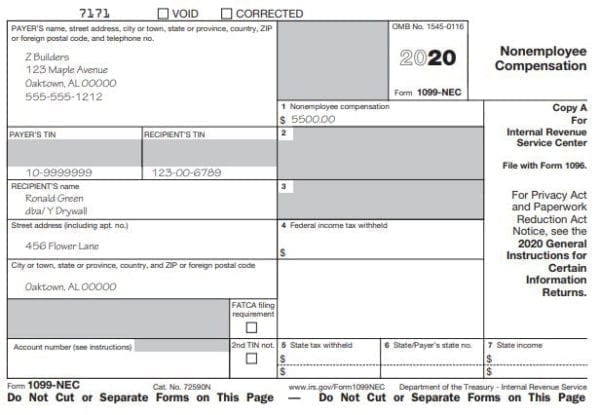
Add additional information if needed in the other boxes provided. Visit the Instructions for Forms 1099-MISC and 1099-NEC for more details.
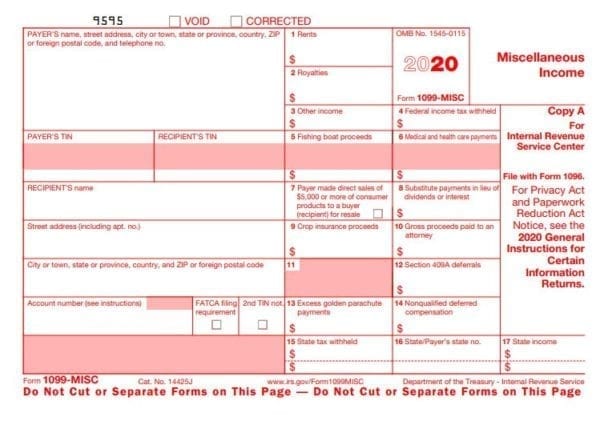
1099-MISC modified form:
Remember, this form was created for 2020; the 2020 1099-MISC has also been adjusted. Below is what that will look like this year and going forward.
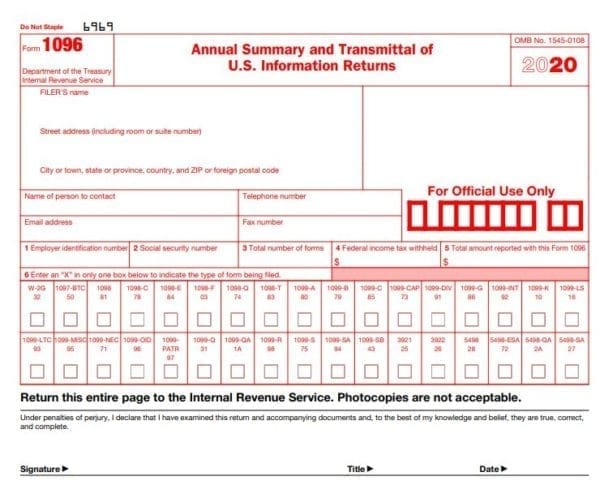
1096 modified form:
Be sure you include the totals for both 1099-MISC and 1099-NEC, plus any other informational forms you need to complete on the 1096 form. There is a checkbox for 1099-NEC. See the image below.
If the software you use to create and print the 1099s does not have the 1099-NEC form, you can order free forms from the IRS and type them up with a manual typewriter if you have one. Here is the link on where to order them: Online Ordering for Information Returns and Employer Returns Order them now and when they are ready, the IRS will send them to you free of charge.
I hope this helps you and your business prepare for the end of 2020 and beyond.
If you need additional help with general bookkeeping or a consultation on how to set up your 1099-NEC or 1099-MISC, feel free to contact me.