Bookkeeping has many detailed steps. If you are not a thorough person, this may be a struggle to handle. I have many clients (affiliate) who, when they started their businesses, didn’t know how to manage all the bookkeeping details. By the time I started working with them, we had to create systems not only to keep the books, but also to manage the paperwork so I could record it accurately. This week, we will discuss essential bookkeeping tips for small businesses. I updated this post to include 2026 tips. Enjoy! I hope it helps you, too.
Tips
- 1. Keep your personal expenses separate from your business account.
- 2. Create a reliable invoice tracking system.
- 3. Use an accordion folder to organize your paper receipts.
- 4. Reconcile your bank and credit card accounts monthly.
- 5. Digital Receipts and Digital Binder
- 6. Spend time filing your receipts away each month.
- 7. Centralized password Management.
- 8. Always have an emergency savings account.
- 9. Have a storage area for your important documents
- 10. Invoice promptly and track what’s owed to you.
- 11. Track mileage properly.
- 12. Review your reports monthly, not just at tax time.
- 13. Consider outsourcing as you grow.
- Closing thoughts
- FAQs
Key Takeaways
- Maintain separate personal and business accounts to avoid commingling funds, which can raise issues with the IRS.
- Create a reliable invoice tracking system, whether physical or digital, to keep your finances organized.
- Use accounting software for efficient bookkeeping, and regularly review financial reports each month, not just at tax time.
- Organize receipts with a well-structured system and ensure all important documents are stored securely.
- Consider outsourcing bookkeeping as your business grows, and prioritize establishing strong financial habits early on.
Below are bookkeeping tips for small businesses and solopreneurs.
1. Keep your personal expenses separate from your business account.
Think of your business as a separate entity. Minimize personal charges in the account. If you do have to use your company for personal use, be sure to use a “Personal” account name and write in the memo section what it was precisely for. This way, your accountant will know the reason for the personal charge.
Commingled funds aren’t helpful because they blur the boundary. Money flows out of the same account for both business and personal expenses.
The IRS and the courts will test whether your business is real, and if they see several personal transactions, it can become a problem if you need to go to court or get an audit. If you mix business and personal money, the IRS may say your business isn’t a real, separate business.
Plus, if you outsource your books to a bookkeeper, they will have trouble figuring out what each receipt is for and whether it’s business or personal.
An important note to add here. You should always pay yourself the same amount each month, not random amounts or sporadic amounts. It is best to be consistent with what you are using for personal expenses.
2. Create a reliable invoice tracking system.
If you invoice your clients (affiliate) more frequently than once a month, create a folder for each client and place only their paid invoices in that folder. That way, at the end of the year, you can see all the invoices each client had for that year. Place them in order from oldest to newest, with the newest on top. Remove any cleared mobile checks from your clients (affiliate) and shred them. Write the check number, amount paid, and date paid on the invoice. You do not need the checks that cleared.
If you prefer digital, try this! Create folders under a Clients folder named after each client. Then, within that folder, store invoices and contracts for later reference.
Apps like QuickBooks Online and FreshBooks (affiliate) also have a Clients or Customer section where you can write notes. Note: If you change apps, you may not have access to the prior years’ invoices, so I still like to keep these files digital on a NAS server or external drive. All you need to do is download the invoices, name them, and store them in each client’s folder.

Scanner: Epson WorkForce ES-50 Portable Sheet-Fed Document Scanner for PC and Mac
Buy Now →
Seagate Portable 2TB External Hard Drive HDD
Buy Now →(affiliate)
Now that you have settled your paid invoices, it’s time to maintain your books in order throughout the year.
3. Use an accordion folder to organize your paper receipts.
Create categories such as office supplies, office expenses, Cost of Goods Sold (COGS), auto repairs, etc.
 Buy Now →
 (affiliate)
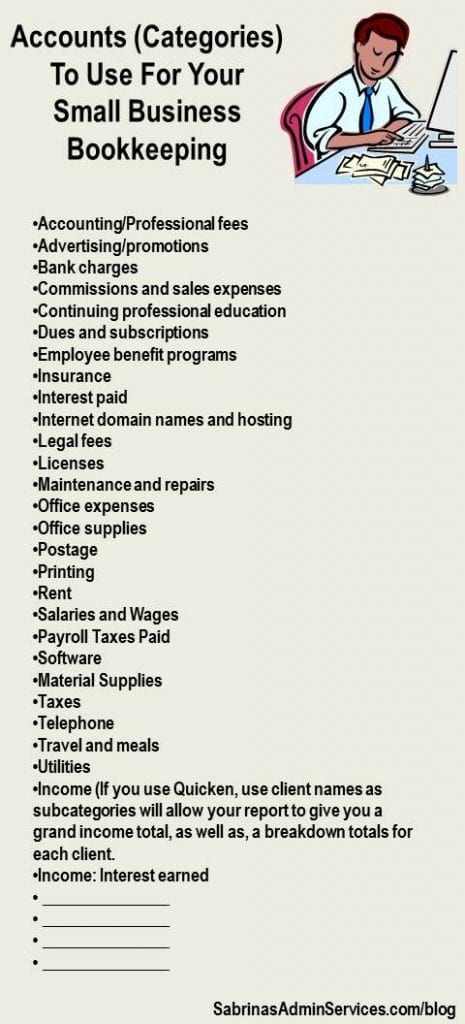
Below is a list of accounts you can use to start. Some may apply, and others do not. You do not need to add all of them. Just the ones that apply to your business.
These categories may already be set up in your QuickBooks Online or FreshBooks (affiliate). If there are categories (accounts) that are not being used after a year of work, you can ask your accountant or bookkeeper if you need to keep them or hide them. These apps usually have way too many accounts.
Manage your financial life and achieve more. Try Quicken for 30 days with our money-back guarantee. Products To Help You Manage Your Money:
Quicken Simplifi - Great for personal tracking
Quicken Business & Personal - perfect for mobile users strictly
Classic Quicken for Windows and Mac - Ideal for laptop users and convenient for viewing on the go.


4. Reconcile your bank and credit card accounts monthly.
Better yet, update your bank transactions weekly. This way, at the end of the month, reconciling your accounts won’t take you long. Print the bank statement or keep it in a folder on your computer to store statements efficiently.
Please reconcile your credit card statements monthly. If you have few charges, you can staple the receipts to each credit card statement so you have everything you need if your accountant or the IRS asks about them. Read more in our post: Benefits of Reconciling Your Credit Card Statements.

Benefits of Reconciling Your Credit Card Statements
When tax time arrives, do you have your paperwork organized, and are all your statements reconciled?

How to Keep Business Credit Card Receipts
While reconciling bank accounts is essential, you need proof of receipts for all your transactions, even credit card transactions.
Check out my 15-minute weekly money date checklist, where I share several tasks you can do every Friday to help you stay on top of all these tasks. The more consistently you do this, the better you will feel at tax time.
Try Accounting Software
Try using Quicken (affiliate) for Home Business, FreshBooks (affiliate), QuickBooks Online, Xero, Zoho Books, or QuickBooks Desktop Pro to manage your bookkeeping. Since you can set up downloads, this will save you from entering all the data. Make sure you select the correct account when you download. The software may not retrieve the correct account, so check carefully before accepting what the bank claims has cleared.
Some software may be more complicated, so try it before buying. While they usually use the same terminology, some may categorize items differently, which can be harder for some people to locate.
Perfect for Business Bookkeeping for the self-employed to small businesses with contractors and employees.
Features include Invoicing, Billing and Payments, Expenses, Accounting, Payroll, and more! Try it Today!

5. Digital Receipts and Digital Binder
With everyone traveling extensively while running their businesses and accountants handling taxes digitally, it is best to store all your digital receipts and supporting documents on a reliable hard drive or with a secure cloud provider like Google Drive, Dropbox, iCloud, or OneDrive for Business. Feel free to check out my digital receipts processes, which are free ebooks to download and use.
Having an effective digital folder system will help you keep all your important papers together. Want to know how to create one? Check out my free receipt folder layout sheet below.
How to Make a Digital Bookkeeping Binder
Each business must manage receipts, including bills, confirmation forms, and statements. We have previously discussed a paper bookkeeping binder and how to organize it. Today, we will discuss how to set up the structure of a digital bookkeeping binder.

How to Make a Well-Organized Business Digital Receipt Organizer
Now that almost all businesses do transactions digitally, it’s a great time to organize your digital receipts. This post has everything you need to set up a digital receipts organizer so you can access important documents when tax time rolls around.
6. Spend time filing your receipts away each month.
If you set up a well-organized receipt system, both digital and physical, you can maintain it indefinitely, and each year, you only need to relabel folders and files for the current year.
Schedule time to sort through your receipts. A great time to do this is after you reconcile your account. I place them in a bin, and then at the end of the month when I reconcile, I sort the receipts into the accordion folder.
Yes, we still get receipts in paper form and digital form. Both systems need to be interchangeable and labeled the same to make it easier to find things across computers and paper files.
7. Centralized password Management.
As business owners, we have numerous passwords, from personal to business. Keeping them secure and easy to access is key to running an effective business.
Find one that meets your needs for both business and personal information. Below is a list of password management apps you may want to check out.
Some additional things to consider when selecting a password manager:
- Look for robust encryption, such as 256-bit AES, to protect your data.
- Also, look for secure password-sharing options so you can share passwords with team members for effective collaboration.
- Some tools monitor (affiliate) password strength and notify you of duplicates and weak passwords.
- All of them should provide two-factor authentication (2FA) to protect your accounts.
- Also, ensure that the password manager provider cannot access or manage your encrypted data.

Tips to Make a Strong Password
We all have to make up several passwords. It’s an annoying but necessary task. Taking a few extra steps to create a strong password will protect you and your small business.
8. Always have an emergency savings account.
No matter how small your business is, save at least $100 per month to build your emergency savings account. This will be helpful when money is short and you need to repair broken items. The trick is to set up an auto-transfer and forget about it. This emergency savings account needs to grow.
Having at least 3-6 months of emergency savings will help you and your business weather the economic storms. Keep this money in its own savings account, not in your checking account. It will help cover a slow month or an unexpected repair without touching a line of credit. Feel free to read this article about building an emergency fund from PNC.

How To Create A Small Business Emergency Savings
It’s no secret that disasters happen even in business. But are you ready for it? How much money do you need in your small business emergency savings (Rainy day fund) to help you in the case of those moments?
9. Have a storage area for your important documents
Not being able to find the company’s corporate paperwork or stamp is frustrating. Lost checks and credit cards can be annoying and make it difficult to conduct business. Keeping these essential items in one place, secured from prying eyes, will give you peace of mind. Below are our emergency preparedness posts to help you store these items safely.

7 Emergency Preparedness Backup Systems To Have In Place
As I mentioned in an earlier post, September is National Preparedness Month. This post will help you review your backup systems to ensure they are ready for any potential issues.

Tips on Preparing your Office for an Emergency
How ready is your office? Is your office ready to be moved at a moment’s notice? With national disasters, small businesses must be prepared for anything.

Important Tips When You Set Up The Business Emergency Process
Are you ready for an emergency? Will your business survive? With what we have learned from the COVID-19 pandemic, the hurricanes, and other national disasters coming each year, we need to be prepared so we can function wherever we are.
10. Invoice promptly and track what’s owed to you.
Don’t let invoices linger. You will regret it. Make it a rule to send invoices 1-2 business days after a project is finished. And make sure that you include the payment terms – due upon receipt, 10 days net, 15 days net, 30 days net, etc. If you don’t know what hasn’t been paid, check the Accounts Receivable Aging report in your app and resend or follow up with clients accordingly.
11. Track mileage properly.
Did you know you need to track your mileage, where you are going, and what you are doing when you track mileage for your vehicle? Yes, I talk about it in my recent post: The Easy Way to Track Mileage. In this post, I share a free checklist, the current year mileage rate for business, and apps to help you determine what you need in your business tracking sheet.
12. Review your reports monthly, not just at tax time.
Review your financial reports every month to make sure you are on track for the year and not overspending. Visit my post on which report to review and when. Readers have been requesting this post, and I created it just for you all.

How Often to Review Business Bookkeeping Reports
Reviewing your small-business accounting files and reports is crucial to your business’s success.
13. Consider outsourcing as you grow.
Bookkeeping is not for everyone. So there is no shame in handing it off to a reliable, trustworthy professional. Feel free to check out my “Questions to Ask a Bookkeeper” post for help. If you want help figuring out what they would need to do, check out my Virtual Consulting services.

Questions to Ask a Bookkeeper In An Interview
When looking for the right bookkeeper for your small business, there are specific questions you should ask a bookkeeper. Not all bookkeepers are created equal for small business owners.
Closing thoughts
It is okay if you haven’t started from the beginning of your business. Just begin in January of the current year to have a complete year of transactions. Before the end of the year, you can catch up with just 4-5 hours each Saturday from now until the end of the year.
When you establish a habit of reconciling and keeping up with your transactions, managing them will be a breeze.
FAQs
Bookkeeping is the day-to-day recording of transactions, reconciling accounts, tracking invoices, and filing receipts. Accounting takes that data and turns it into tax filings, financial strategy, and higher-level analysis. Most solopreneurs need consistent bookkeeping year-round and an accountant at tax time.
Weekly is ideal, but monthly is the minimum to stay in control. If more than 60 days pass without reconciling, transactions pile up, receipts go missing, and what should take 15 minutes turns into hours of cleanup.
Yes, they play different roles. A bookkeeper keeps your books accurate and current throughout the year; an accountant uses those clean books to file your taxes and advise on bigger financial decisions. Clean books also mean lower accountant fees, since they aren’t billing you to untangle your records first.
Start with one habit: separate your business and personal accounts, then pick one accounting software and commit to reconciling weekly. If you’re mid-year and behind, don’t try to go back to January; start now and catch up in 4-5-hour blocks until you’re current.
If you’re consistently behind on reconciling, dreading the process, or your time is worth more spent on client work than data entry, it’s time to hand it off. A good sign: you’ve fallen more than a month behind more than once.
At minimum, review your profit & loss statement and your Accounts Receivable Aging report so you know what you earned, spent, and what clients still owe you. If cash flow feels tight, add a monthly cash flow statement to the review.
I hope these bookkeeping tips for small businesses get you motivated to get your books in order. If you need assistance, please don’t hesitate to contact a professional. If you need a bookkeeper and want to keep your books clean and easy to read, feel free to contact me.
Feel free to visit our other bookkeeping tips page.
How Long Should I Keep Business Records
7 Ways to Speed Up Bookkeeping Tasks for Startup Solopreneurs
How to Create a Well-Organized Small Business Bookkeeping Binder
Below are some more related bookkeeping posts!